Найти в Дзене
JL Engineer’s Work Log 3: Common Issues When Adding Custom Prompt Tones on Jieli AC6966B
Introduction When developing Bluetooth speakers with Jieli’s audio SoCs, adding custom prompt tones often brings up a few common issues – popping noises during power on/off, unsupported audio formats, etc. This guide walks through these issues and their solutions using the Jieli AC696N development board. // Power on: disable PA before ramping up // Power off: disable PA before shutdown Explanation: When the speaker is powered on or off, the amplifier (PA) and speaker can produce a pop/click sound – this is normal behavior...
3 дня назад
Engineer’s Work Log: Implementing Button-Triggered Pairing for TWS Paired Speakers on Jieli AC696N
Issue A customer is developing TWS paired speakers using the Jieli AC696N development board. They need to implement a “button-triggered pairing” function, but are unsure which IO pin to connect the button to and how to configure it in the code. Analysis & Reproduction When reviewing the Jieli AC696N TWS paired speaker example project, we found that pairing is typically triggered by an AD key or a regular GPIO key. The example project reserves the pairing button logic, but does not explicitly state the hardware connection or software configuration mapping...
1 неделю назад
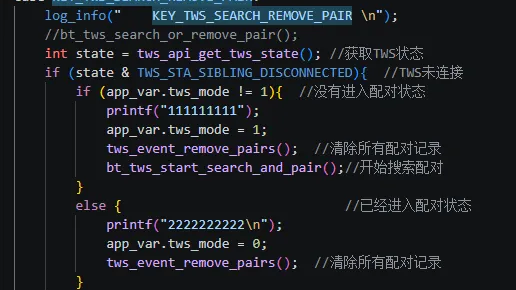
Engineer’s Work Log: Implementing Button-Triggered Pairing for TWS Paired Speakers on Jieli AC696N Issue A customer is developing TWS paired speakers using the Jieli AC696N development board. They need to implement a “button-triggered pairing” function, but are unsure which IO pin to connect the button to and how to configure it in the code. Analysis & Reproduction When reviewing the Jieli AC696N TWS paired speaker example project, we found that pairing is typically triggered by an AD key or a regular GPIO key. The example project reserves the pairing button logic, but does not explicitly state the hardware connection or software configuration mapping. The correct setup requires cross-referencing the schematic diagram and the key scan module in the code. Solution Open the TWS paired speaker example project and locate the key configuration section: 1.Hardware connection: It is recommended to connect the pairing button to PB4 (which is defined as an AD key channel in the Jieli AC696N factory firmware). Different buttons are distinguished by their AD sampling values. 2.Code configuration: In adkey_table.c (or the user key configuration table), find the macro KEY_TWS_SEARCH_REMOVE_PAIR (pairing function). Bind this macro to the specific AD key value. 3.Modification example: In the key mapping array, set the trigger event of the corresponding AD key to KEY_TWS_SEARCH_REMOVE_PAIR, and ensure the button press duration meets the default pairing trigger condition (e.g., long press for 3 seconds). After completing the configuration, compile and burn the firmware. The button will then trigger TWS pairing. Summary The customer reported “OK” after half an hour following the guidance. The AC696N TWS example project already contains a complete pairing flow. Developers only need to correctly bind the button event to the hardware IO. It is recommended to refer to the key configuration section and comments in the AC6966B TWS paired speaker example project, and to use AD keys to save IO pins. This is a common sticking point in TWS paired speaker development – recorded here for fellow engineers.
1 неделю назад
Полное руководство по управлению GPIO для серии JL JieLi AC696N: режимы, API и специальные выводы
Введение Настройка GPIO кажется простой, но примеров неудач немало. Неправильно выбранная сила тока – светодиод тусклый или вообще не горит. Без правильно настроенной подтяжки – кнопки работают непредсказуемо. Самое коварное – выводы USB по умолчанию могут быть обычными GPIO, и если забыть переключить функцию, компьютер не увидит устройство. GPIO у JL JieLi AC696N довольно функциональны: три уровня силы (обычный, сильный, сверхсильный) и различные API. Однако документация разбрасывает эти функции повсюду, и при использовании приходится их долго искать...
3 недели назад
Разработка для чипов серии JL JieLi AC696N – Подробное объяснение таймеров: различия и выбор между sys_timer и usr_timer
Введение Таймеры кажутся простыми, но их неправильное использование либо увеличивает энергопотребление, либо приводит к неточностям синхронизации – и отладка может быть весьма болезненной. SDK для JL JieLi AC696N предоставляет два набора таймеров: sys_timer и usr_timer. При первом знакомстве легко запутаться – когда какой использовать? Почему мой таймер начинает работать неточно после перехода в сон? Можно ли выполнять работу в callback-функции? Со всеми этими вопросами я столкнулся при отладке решений с низким энергопотреблением на плате разработки AC696N...
2 месяца назад
Если нравится — подпишитесь
Так вы не пропустите новые публикации этого канала