Stop hunting for codes that don't work. Learn our proven strategies to find real savings on every purchase.

AliExpress offers millions of products at low prices — BUT finding real, working discount codes? That’s where most shoppers get stuck.
This guide removes the guesswork. You’ll learn exactly where to look, what types of coupons exist, and how to combine them for maximum savings. No fluff. No hype. Just clear steps.
You’ll walk away knowing:
- The 3 main coupon types (and which ones stack)
- Where to find active codes — both on and off AliExpress
- How to apply them without errors
- Advanced tricks used by seasoned shoppers
- When the BIGGEST sales happen each year
Key Takeaways: Your Quick Guide to AliExpress Savings
- New Users Get the Best Deals = Sign up? Claim your welcome coupon immediately. It’s often $3–$5 off your first $5+ order.
- There Are 3 Main Coupon Types = Store Coupons (seller-specific), Select Coupons (item-specific), AliExpress Coupons (platform-wide).
- Visit the Coupon Center = Before adding anything to cart, go here: Account > Coupon Center. Claim everything available.
- Stacking is Possible (Sometimes) = Combine one Store Coupon + one Select OR AliExpress Coupon per order. NOT both Select + AliExpress.
- Use AliExpress Coins = Earn coins daily via the app. Exchange them for $1–$3 coupons. Free money if you check in.
- Shop During Major Sales = March Anniversary Sale and November 11.11 Sale drop the heaviest discounts.
- Always Check for Codes at Checkout = AliExpress auto-suggests applicable coupons on the payment page. Don’t skip this.
Ready to become a savings pro? Let’s go.
1. Understanding the Different Types of AliExpress Discounts
AliExpress doesn’t use one universal promo code system. It layers discounts — store-level, item-level, and platform-level. Knowing the difference saves you cash.
New User Coupons & Welcome Deals
First-time buyers get a gift. Usually $3–$5 off orders over $5. Sometimes free shipping.
Where to find it:
- Homepage banner after signup
- Dedicated “Welcome Deal” landing page
- Automatically loaded into your coupon wallet
“Wait — I signed up but didn’t get a coupon.”
→ Go to Account > Coupons. If empty, clear cache or try signing up via mobile app. Some browsers block auto-loading.
Source: https://techodom.com/aliexpress-discount-codes/
Ed. note: New user coupons expire in 7–30 days. Use them fast.
Store Coupons (From Individual Sellers)
These are discounts offered by a single shop. Example: “$2 off $15” or “10% off all items.”
Where to find them:
- On the product page — look under the price for “Store Coupon”
- On the seller’s store homepage — click “Coupons” tab
- By following a store — sometimes unlocks “Follower Only” coupons
Screenshot tip: On any product page, scroll just below “Add to Cart.” You’ll see a yellow “Claim” button if a store coupon exists.
Select Coupons (From AliExpress, for Specific Items)
These work across multiple stores — but ONLY on items marked “Select Coupon Eligible.”
Think of it like this:
Select Coupon = Works on 10,000 specific items across 500 stores. Not site-wide. Not store-wide. Item-specific.
Where to find them:
- Coupon Center (Account > Coupon Center)
- During sales events (banners will say “Collect Select Coupons”)
- Sometimes auto-applied at checkout if your cart qualifies
AliExpress Coupons (Platform-Wide Codes)
These are the gold standard. Work on almost anything. Minimum spend usually applies ($10–$50). Released during big sales.
Example: “$5 off $30 sitewide.”
Where to find them:
- Coupon Center
- Official AliExpress sale pages (11.11, Anniversary Sale)
- Reputable deal sites (more on this later)
Important: These are the codes you paste into the “Promo Code” box at checkout. Others apply automatically.
2. Where to Find Working AliExpress Discount Codes (Step-by-Step)
Now that you know the types of discounts, here are the 5 best places to find them.
Method 1: On the Product Page
Every item page shows available Store Coupons. Always check before adding to cart.
Steps:
- Open any product
- Scroll below price and shipping info
- Look for “Store Coupon” section
- Click “Claim” — coupon is saved to your account instantly
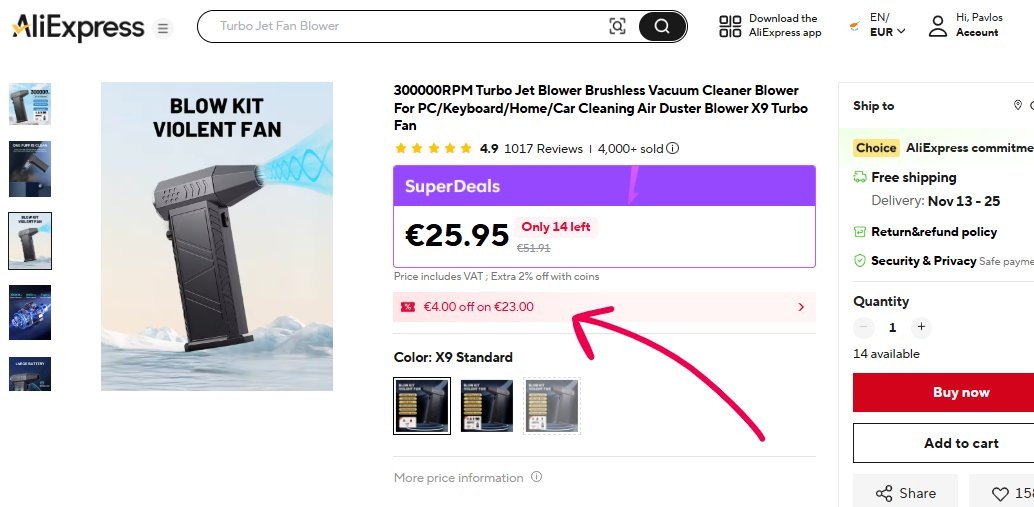
Pro tip: Sellers often hide higher-value coupons behind “Follow Store.” Click it. Then check again.
Method 2: The AliExpress Coupon Center
This is your command center. All major coupons live here.
Steps:
- Log in
- Tap your profile icon (top right)
- Click “Coupon Center”
- Click “Claim” on every coupon you see
What you’ll find:
- AliExpress Coupons (platform-wide)
- Select Coupons (item-specific)
- Flash Deals with automatic discounts
- Coins exchange options
Check this DAILY during sales. New coupons drop hourly.
Method 3: During Major Sales Events
Biggest discounts drop here. Mark your calendar.
Key 2024 dates:
- Anniversary Sale: Late March
- Summer Sale: June–July
- 11.11 Global Shopping Festival: November 11
- Black Friday / Cyber Monday: Late November
During these, AliExpress releases:
- Sitewide promo codes (e.g., AE2024SAVE)
- Staggered coupons (claim early — they run out)
- Bonus coin rewards for checking in
“Do I need to wait for sales to save?”
→ No. But if you can hold off, you’ll save 20–50% more during these windows.
Source: https://techodom.com/aliexpress-discount-codes/
Method 4: Through AliExpress Coins
Coins = currency. Earn them. Spend them on coupons.
How to earn:
- Daily check-in (app only) = 5–20 coins
- Play mini-games (like “Money Hop”) = 10–50 coins/day
- Invite friends = 100–500 coins per signup
How to spend:
- Open AliExpress app
- Go to “Coins & Coupons” (bottom menu)
- Tap “Exchange”
- Pick a coupon: $1 off $5, $2 off $10, etc.
Coins reset monthly. Don’t hoard. Spend before month-end.
Method 5: From Affiliate & Deal Websites
Yes, third-party sites share real codes — especially during sales.
Stick to reputable sources:
- Slickdeals
- RetailMeNot
- Honey (browser extension)
Avoid random blogs or Telegram channels. Many post expired or fake codes.
“How do I know if a site’s legit?”
→ Check publication date. Real codes update DAILY during sales. If a “11.11 code” was posted in January? Skip it.
3. How to Apply a Promo Code at Checkout
Follow these steps. Miss one? Code won’t work.
- Add items to cart. Proceed to checkout.
- Fill in shipping address. Confirm delivery method.
- On the right side, find the box labeled “Promo Code.” → Screenshot: Highlight this box. It’s easy to overlook.
- Paste your code. Click “Apply.”
- Verify discount appears under “Order Summary.”
- Pay ONLY after confirming the amount dropped.
Common mistake: Applying a code AFTER selecting payment method. Go back. Re-enter code. Some gateways reset the field.
4. Advanced Strategies to Maximize Your Savings
Finding a code is only half the battle. Here's how to stack deals like a pro.
Strategy 1: Stacking Coupons Correctly
Rules:
- ✅ YES: 1 Store Coupon + 1 Select Coupon
- ✅ YES: 1 Store Coupon + 1 AliExpress Coupon
- ❌ NO: 1 Select Coupon + 1 AliExpress Coupon (system blocks this)
- ❌ NO: Multiple promo codes in the text box (only one allowed)
Example:
- Buy shoes from Store A ($25).
- Apply Store Coupon: $2 off $20 → $23
- Apply AliExpress Coupon: $3 off $25 → $20 final
- Total saved: $5
Strategy 2: Consolidate Orders to Meet Minimums
Seller coupons often require minimum spend: “$5 off $50.”
Solution: Buy multiple items from the same store.
Need phone case + screen protector + charger? Get all three from one seller. Hit $50. Save $5.
Bonus: Lower shipping costs. One package > three packages.
Strategy 3: Filter for “Free Shipping”
Shipping fees kill savings. Avoid them.
How:
- Search any product
- Click “Filters” (left sidebar or top bar on mobile)
- Check “Free Shipping”
- Only items with $0 delivery cost appear
Works globally. Even to remote countries.
Strategy 4: Follow Your Favorite Stores
Click “Follow” on any store page.
Why?
- Get notified when they drop new coupons
- Unlock “Follower Only” discounts (often 5–10% extra)
- First access to Flash Deals
Takes 2 seconds. Pays off long-term.
5. Frequently Asked Questions (FAQ)
How do I get an AliExpress new user coupon?
Sign up. Coupon loads automatically. If not:
- Go to Account > Coupons
- Try signing up via mobile app — higher success rate
Can you use more than one promo code on AliExpress?
No. Only one code fits in the “Promo Code” box.
BUT — you can combine that with auto-applied Store and Select coupons. So technically, you’re using 2–3 discounts per order.
Why is my AliExpress discount code not working?
Common reasons:
- Code expired (check date)
- Minimum spend not met (e.g., $5 off $30, but cart is $25)
- Wrong category (code works only on electronics, but you bought clothes)
- New user code — and you’re not new
- Typo in code (copy-paste to avoid errors)
What is the best time to find AliExpress discount codes?
March (Anniversary Sale) and November (11.11 Sale).
These events release:
- Highest-value sitewide codes
- Limited-time flash coupons
- Bonus coin multipliers
Plan big purchases around these dates.
Source: https://techodom.com/aliexpress-discount-codes/
Conclusion
Recap:
- Know your coupon types: Store, Select, AliExpress
- Always visit Coupon Center before shopping
- Stack Store + Select OR Store + AliExpress — never both platform codes
- Use Coins. They’re free money.
- Shop during March or November for deepest discounts
- Filter for free shipping. Always.
Final tip: Use the AliExpress mobile app. More coupons. Easier coin collection. Faster checkout.
You now have the exact system used by expert savers. No more guessing. No more missed deals.
Go shop. Save hard. Pay less.
Every. Single. Time.