Imagine: A client from India writes in Hindi, but their lead is assigned to a manager who only speaks English. The result? Miscommunication, frustration, and a lost deal. This happens daily in companies where leads are distributed randomly or just in a queue. The solution? The 'Select Department Employees' activity + flexible logic customization. Here’s how it works. Step 1: Install the App Step 2: Set Up Manager Selection Based on Parameters Step 3: Example for Leads from India
Assume you have: Workflow Logic: 🔹 Try it yourself: "Install the app and test the basic scenario. Need help? Comment below!"
🔹 Request customization: *Want smart lead distribution tailored to your needs? Message ‘I want this’ in Comments

Imagine: A client from India writes in Hindi, but their lead is assigned to a manager who only speaks English. The result? Miscommunication, frustration, and a lost deal.
This happens daily in companies where leads are distributed randomly or just in a queue.
The solution? The 'Select Department Employees' activity + flexible logic customization. Here’s how it works.
2. When Is This Needed?
- Lead speaks a rare language (Hindi, Arabic, Chinese) → assign to a manager who knows it.
- Client from a specific region (Europe, Asia, Middle East) → manager with experience there.
- Specialized product/service (e.g., SaaS for healthcare) → assign to an employee with relevant expertise.
3. How Does It Work?
Step 1: Install the App
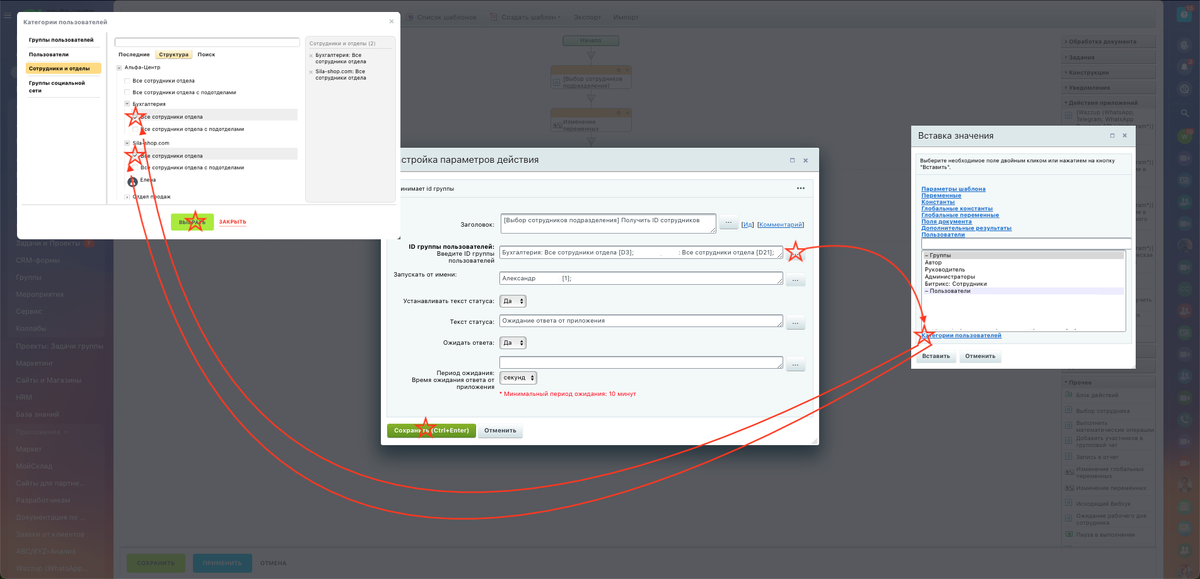
Step 2: Set Up Manager Selection Based on Parameters
- In the workflow, add the "Select Department Employees" activity.
- Configure settings:
Department (e.g., "Sales Team").
Additional filters (if the app supports it, e.g., via custom fields).
Step 3: Example for Leads from India
Assume you have:
- A lead field "Client Language" (Hindi, English, Arabic).
- A manager profile field "Languages Spoken" (multi-select).
Workflow Logic:
- The activity selects all sales team managers.
- A filter keeps only those with "Hindi" in their profile.
This is a basic setup. But if you need:
- Workload balancing (to avoid overloading one manager),
- Auto-detection of language/region (by phone number or email),
- Lead 'weighting' (VIP → only senior managers),
— you’ll need customization. We’ve implemented these for [example company] — message me to learn more!"*
🔹 Try it yourself: "Install the app and test the basic scenario. Need help? Comment below!"
🔹 Request customization: *Want smart lead distribution tailored to your needs? Message ‘I want this’ in Comments