In this video, we will look at how to connect brushless motor controllers to a Linux computer. Specifically, we will use a computer running Debian. The same steps would work for Ubuntu Linux and other Linux distributions derived from Debian.
I've got a small sensorless brushless motor, and a bigger brushless motor with a built-in absolute encoder. Lets look at how to control those from my Debian Linux computer.
Servosila brushless motor controllers come in several form factors with either a circular or a rectangular shape. The controllers come with a set of connectors for motors and encoders as well as for USB or CANbus networks.
The controllers can be powered by a power supply unit or by a battery. To spice up my setup, I am going to use a battery to power the controllers and thus their motors. The controllers need 7 to 60 volts DC of voltage input. If I connect the battery, the controllers get powered up. The small LED lights tells us that the controllers are happy with the power supply.
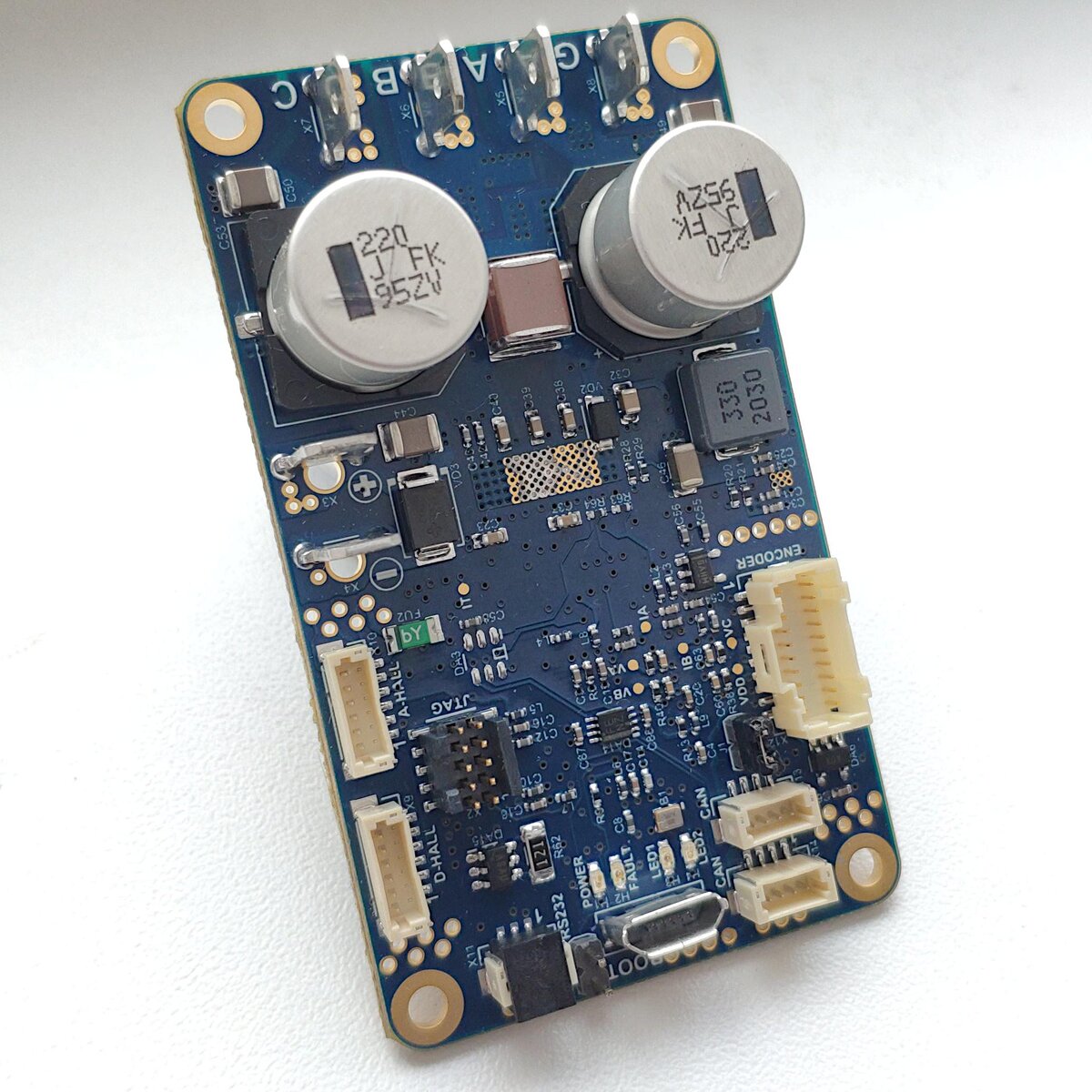
We need to connect the brushless motor controllers to the Linux computer. There are two ways to do that - via CANbus or via USB. Lets look at the USB option first. A regular USB cable is used. Only one of the controllers needs to be connected to a computer or a PLC.
Next, we need to build an internal CAN network between the brushless motor controllers. We are going to use a CANbus cross-cable to interconnect the controllers. Each controller comes with two identical CANbus ports that help chain multiple controllers together in a network. If one of the interconnected brushless motor controllers is connected to a computer via USB, then that particular controller becomes a USB-to-CANbus gateway for the rest of the network. Up to 16 controllers can be connected this way via a single USB cable to the same control computer or a PLC. The limit is due to finite throughput of the USB interface.
Lets plug the motors to their controllers. The simple sensorless motor has just three phase wires. The more complicated bigger motor comes with three phase wires, a ground wire, and an absolute encoder cable. For now, I will connect just the phase wires and the ground wire. The controllers come with blade terminals for connecting the motors. The terminals are designated as A, B, C and G. There are also soldering holes for the motor cables. Unplug the power supply before connecting the motors. Now, lets power up our motor controllers, and turn our attention to Debian Linux computer.
The controller connected to the computer appears to Linux as a virtual serial port. If we list all the serial devices in Linux, we shall find our controller in the list (/dev/ttyACM0):
ls -la /dev/tty*
The controllers use text messages to deliver telemetry data to the computer. We are going to look at the messages now. This command is supposed to display text messages that the controller sends to the computer.
cat /dev/ttyACM0
What happened is that Linux prevented us from accessing the serial port due to some default security restrictions. To lift the restrictions, we need to add the "user" account to a group called "dialout". The group lists the users who are allowed to access serial ports. You have to invoke administrative privileges to add yourself to the "dialout" group. Use the "adduser" command in Debian:
/usr/sbin/adduser user dialout
...or an equivalent "sudo usermod" command in Ubuntu:
sudo usermod -G dialout $USER
Linux requires you to log out and log in again for the updated security permissions to go into effect.
Lets try display telemetry messages again. It worked this time. The controller encodes telemetry in a text string. We will look into the format of the string in a separate video.
One more thing. If you plug the USB cable, and then immediately try to connect to the serial port, you may observe a "Device Busy" error. The ghost error disappears on its own in a few seconds as you keep trying to connect to the port. This issue can be fixed.
What happens is that a standard Linux program called Modem Manager, automatically connects to the serial port thus preventing you from accessing it. The simplest way to fix the problem is to uninstall the Modem Manager:
apt-get purge modemmanager
Now that we have finished configuring Linux, we can install a graphical software tool called Servoscope. Un-zip the downloaded package in your home directory. Open a terminal, and go to the directory with un-zipped files. Launch the Servoscope program by executing this shell script in the following way:
./servoscope.sh
The Servoscope program provides means to configure your brushless motor controllers, read telemetry, send commands to the controllers, plot performance charts, and so on. Pick the name of the proper serial port in the drop-down menu, and click the "Connect" button. If the port is not listed in the drop-down menu, click the "Refresh" button.
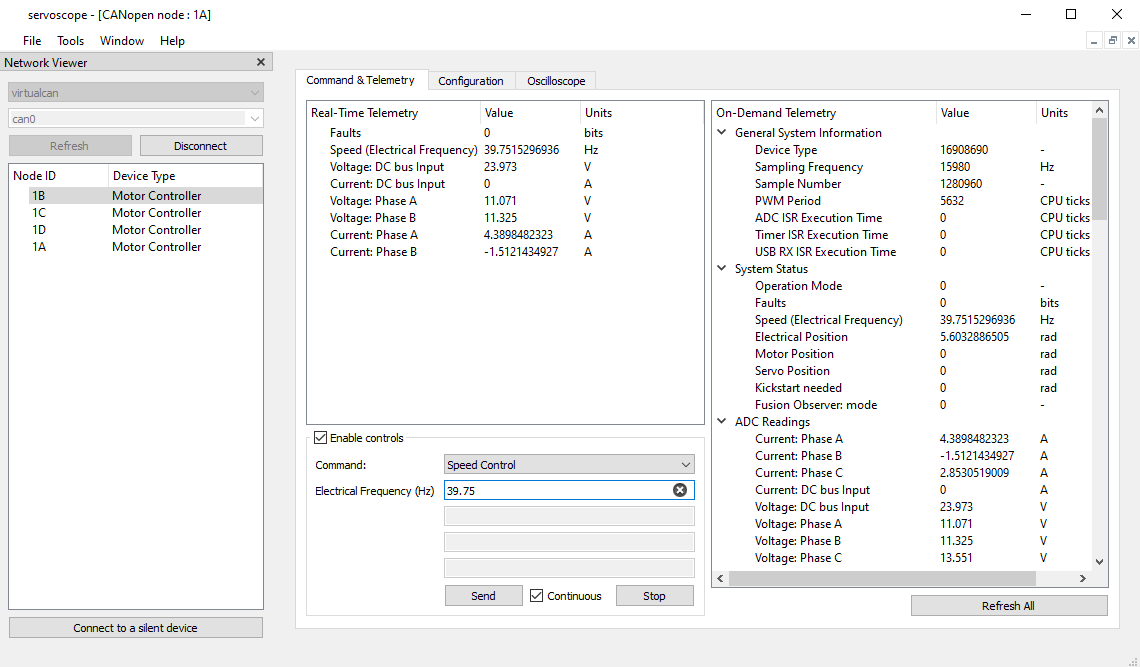
Both controllers appear in a list of devices. Double-click on a device name to open a command and configuration window. The window has a telemetry and a configuration management sections. You can monitor multiple controllers at the same time. We will look into the Servoscope software with a great detail in a separate video. At this time, you may wish to check input voltage displayed in the telemetry section.
What I am going to show next is just a demo of the controller's auto-configuration function. I suggest that you watch a dedicated video regarding the Auto-Configuration function, since this topic requires some background information. From the drop-down menu, select the Auto-Configuration command. Specify a maximum phase-to-phase electric current that your motor can handle. Specify the number of poles your motor has. Click the Send button.
The motor produces a beep sound. The sound indicates the beginning of an auto-configuration procedure. The controller sends sounding electrical signals to the motor. This way the controller measures various characteristics of the motor, and then configures itself for this particular motor. The motor makes what looks like mysterious kong-fu moves during the auto-configuration routine. The motor accelerates to its maximum speed. Be careful as the motor is producing its maximum torque at this moment. The rapid accelerations may take place a few times during the auto-configuration procedure. The second beep sound indicates the end of the auto-configuration procedure.
Now we need to repeat the routine for the smaller motor. Switch to the other window. Pick Auto-Configuration command from the drop-down menu. Specify a maximum phase-to-phase electric current that your motor can handle. Specify the number of poles your motor has. By the way, these values normally come from the motor's datasheet. Click the Send button. This time the smaller motor produces the beep sound, and starts making the kong-fu moves.
The beauty of the Auto-Configuration function is that the controller automatically configures itself when commissioning a new motor. I suggest that you watch a separate video dedicated to pecularities of the Auto-Configuration routine.
Now that both brushless motor controllers have been configured, I am going to send an Electronic Speed Control command to the bigger motor. Choose Electronic Speed Control command from the same drop-down menu. I specified speed as 20 electrical revolutions per second.Hit the Send button. Note that the program sends the commands to the serial port in a text format.The motor starts spinning with the commanded speed.
That's it for now. In this video we looked at how to connect brushless motor controllers to a Linux computer via USB. We will look at CANbus interface option in a separate video.
SERVOSILA SC-25 Brushless Motor Controllers are capable of controlling motors in several different ways called “modes”. The controllers switch from one mode to another upon receiving commands sent via CANbus or USB 2.0 by a control computer/PLC.
- “Torque Control”. In this mode, the system tightly controls a prescribed torque with which a brushless motor actuates its payload. This mode would typically be employed whenever what matters is torque rather than speed of the motor, for example, in a test/diagnostics equipment, or in a highly dynamic walking robot application.
- “Electronic Speed Control (ESC)”. In this mode, the SERVOSILA controllers maintain a constant commanded speed of rotation of the motors’ shafts under an influence of varying external forces. The controllers automatically increase or decrease torque in response to perturbations of external loads thus keeping the speed of the drive constant. This mode is often used when actuating pumps, conveyor belts, thrust drives, mobile chassis, and in many other applications.
- “Servo Control”. In this mode, the controller turns a brushless motor into a servo motor capable of holding a commanded position (with or without a gearbox). Upon receiving a servo command, the controller first moves the drive’s output shaft to a specific commanded position (angle), and then holds the position under an influence of external forces that try to disturb the balance. An encoder is required in this mode to measure absolute position of the drive’s output shaft. The encoder can be connected to the controller via one of available encoder interfaces (BISS-C, SSI, SPI, PWM, Quadrature). Up to 20bit of angular precision is supported. The servo control mode is widely used in applications ranging from servo drives of robotic arm manipulators, to CNC machines, to robotic warehouse systems.
- “Direct Drive”. In this mode the controller directly positions magnetic fields inside a brushless motor, and achieves the highest possible precision of positioning accuracy. This mode is often used with electric drives that do not have a gearbox (thus the name). Typical applications include computer vision systems, CNC machines, linear motor actuators, - all those applications where use of a gearbox is avoided to minimize backlash-related issues that affect positioning accuracy. A brushless motor operated in a direct drive mode is much better than a more traditional stepper motor.
- “Brake”. The controllers implement an energy-efficient “parking brake” mechanism that blocks motor’s motion. This is achieved without a need for an external braking mechanism. In this mode the controller monitors position of a brushless motor’s rotor using either Hall sensors or an encoder, and makes energy-efficient adjustments to the magnetic field inside the motor in such a way that rotation of the output shaft is blocked. The built-in braking mechanism comes handy in applications where motion may need to be stopped and then put on a brake, - such as a conveyor belt or a mobile chassis. Imagine a mobile robot that has to stop while climbing stairs and then use a payload while staying in the inclined position for an extended period of time. The “parking brake” mode efficiently keeps the wheels of such a robot on a brake without wasting too much energy on doing so.
- “Energy Recuperation”. The controllers are capable of controlling (regulating) a flow of electrical current back to a battery whenever a brushless motor becomes an electric generator due to an external force causing rotation of the motor’s rotor. This feature enables the controllers to be used in starter-generator applications when coupled to internal combustion engines, or might help extend the range or endurance of a mobile vehicle through recuperation of its braking energy. The batteries might need to be equipped with additional electronics to be able to safely accept the reverse flow of electrical current.
The firmware of SERVOSILA controllers implements sophisticated brushless motor control algorithms:
- Field-Oriented Control (FOC),
- … with Back-EMF Observer and Hall Sensors Observer,
- … with D-Q Coupling Compensation for smooth operation,
- … with software-controllable Field Weakening for reaching speeds beyond the motor’s nominal speed,
- … with safety features based on many lessons learned,
- … with intelligent controls of the drive’s dynamic characteristics,
- … and automatic system identification of motor’s parameters.
The algorithms ensure a low-noise operation of brushless motors while increasing available torque, minimizing power consumption, and reducing risks of overheating the motor, breaking a gearbox, or causing an injury.
The SERVOSILA controllers provide for a limited control of brushed motors (vs. brushless ones) and solenoids. Brushed motors can only be controlled in an open loop mode. It is possible to control up to 2 brushed motors or solenoids at the same time (vs. a single brushless motor).
Servosila is a technology company that designs, produces and markets robots, servo drives, harmonic reduction gears, brushless motor controllers as well as artificial intelligence software. The company was founded in 2013.
Make sure you subscribe to our YouTube and Telegram channels.
Ask questions on live chat on Telegram.