Приветствую вас, Уважаемые Читатели! Статья содержит значимые конфигурационные файл хостов обсуждаемых в предыдущей статье #0032. Для начала приведу текущую схему сети.
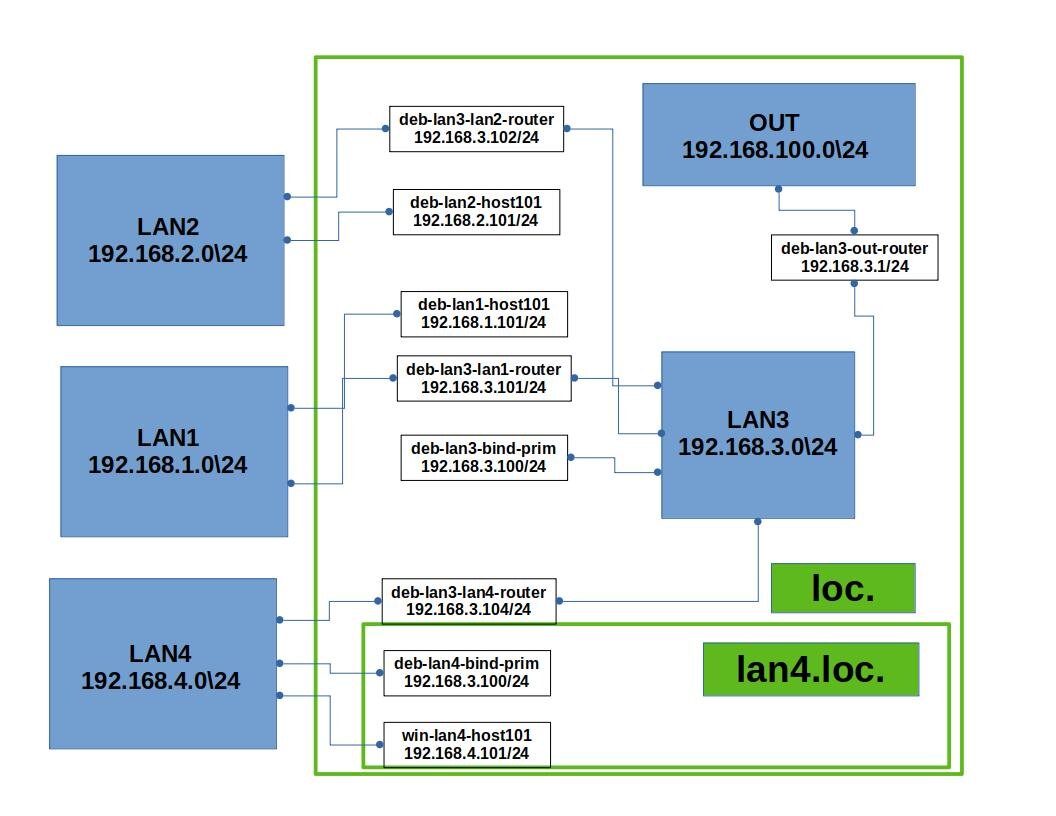
И собственно конфигурационные файлы двух DNS серверов.
deb-lan3-bind-prim
/etc/bind/named.conf.local
//
// Do any local configuration here
//
// Consider adding the 1918 zones here, if they are not used in your
// organization
//include "/etc/bind/zones.rfc1918";
zone "loc"
{
type master;
file "/var/lib/bind/db.loc";
};
zone "168.192.in-addr.arpa"
{
type master;
file "/var/lib/bind/db.168.192.in-addr.arpa";
};
//zone "lan4.loc"
//{
//type slave;
//file "/var/lib/bind/db.slave.lan4.loc";
//masters {192.168.4.100;};
//};
/etc/bind/named.conf.options
options {
directory "/var/cache/bind";
listen-on port 53 {127.0.0.1;192.168.3.100;};
allow-query {any;};
allow-recursion {any;};
allow-transfer {any;};
//forward first;
//forwarders {192.168.100.1;};
// If there is a firewall between you and nameservers you want
// to talk to, you may need to fix the firewall to allow multiple
// ports to talk. See http://www.kb.cert.org/vuls/id/800113
// If your ISP provided one or more IP addresses for stable
// nameservers, you probably want to use them as forwarders.
// Uncomment the following block, and insert the addresses replacing
// the all-0's placeholder.
// forwarders {
// 0.0.0.0;
// };
//========================================================================
// If BIND logs error messages about the root key being expired,
// you will need to update your keys. See https://www.isc.org/bind-keys
//========================================================================
dnssec-validation no;
listen-on-v6 { none; };
};
/var/lib/bind/db.loc
$ORIGIN loc.
$TTL 86400
@ IN SOA deb-lan3-bind-prim.loc. root.deb-lan3-bind.prim.loc (
2025120401;
600;
600;
86400;
600);
@ IN NS deb-lan3-bind-prim.loc.
@ IN A 192.168.3.100
deb-lan3-bind-prim IN A 192.168.3.100
deb-lan3-out-router IN A 192.168.3.1
deb-lan3-lan2-router IN A 192.168.3.102
deb-lan3-lan1-router IN A 192.168.3.101
deb-lan3-lan4-router IN A 192.168.3.104
deb-lan1-host101 IN A 192.168.1.101
deb-lan2-host101 IN A 192.168.2.101
$ORIGIN lan4.loc.
@ IN NS deb-lan4-bind-prim
;lan4.loc. IN NS deb-lan3-bind-prim.loc.
deb-lan4-bind-prim IN A 192.168.4.100
/var/lib/bind/db.168.192.in-addr.arpa
$TTL 86400
168.192.in-addr.arpa. IN SOA deb-lan3-bind-prim.loc. root.deb-lan3-bind-prim.loc. (
2025112901;
600;
600;
86400;
600);
168.192.in-addr.arpa. IN NS deb-lan3-bind-prim.loc.
168.192.in-addr.arpa. IN A 192.168.3.100
1.3 IN PTR deb-lan3-out-router.loc.
101.3 IN PTR deb-lan3-lan1-router.loc.
102.3 IN PTR deb-lan3-lan2-router.loc.
104.3 IN PTR deb-lan3-lan4-router.loc.
101.2 IN PTR deb-lan2-host101.loc.
101.1 IN PTR deb-lan1-host101.loc.
4.168.192.in-addr.arpa. IN NS deb-lan4-bind-prim.lan4.loc.
;deb-lan4-bind-prim.lan4.loc. IN A 192.168.4.100
deb-lan4-bind-prim
/etc/bind/named.conf.options
options {
directory "/var/cache/bind";
listen-on port 53 {127.0.0.1;192.168.4.100;};
allow-query {any;};
allow-recursion {any;};
allow-transfer {any;};
forwarders {192.168.3.100;};
// If there is a firewall between you and nameservers you want
// to talk to, you may need to fix the firewall to allow multiple
// ports to talk. See http://www.kb.cert.org/vuls/id/800113
// If your ISP provided one or more IP addresses for stable
// nameservers, you probably want to use them as forwarders.
// Uncomment the following block, and insert the addresses replacing
// the all-0's placeholder.
// forwarders {
// 0.0.0.0;
// };
//========================================================================
// If BIND logs error messages about the root key being expired,
// you will need to update your keys. See https://www.isc.org/bind-keys
//========================================================================
dnssec-validation no;
listen-on-v6 { none; };
};
/etc/bind/named.conf.local
//
// Do any local configuration here
//
// Consider adding the 1918 zones here, if they are not used in your
// organization
//include "/etc/bind/zones.rfc1918";
zone "lan4.loc."
{
type master;
file "/var/lib/bind/db.lan4";
allow-transfer {192.168.3.100;};
};
zone "4.168.192.in-addr.arpa"
{
type master;
file "/var/lib/bind/db.4.168.192.in-addr.arpa";
allow-transfer {192.168.3.100;};
};
/var/lib/bind/db.lan4
$ORIGIN lan4.loc.
$TTL 86400
@ IN SOA deb-lan4-bind-prim.lan4.loc. root.deb-lan4-bind-prim.lan4.loc.(
2025121401;
600;
600;
86400;
600);
@ IN NS deb-lan4-bind-prim.lan4.loc.
@ IN A 192.168.4.100
deb-lan4-bind-prim IN A 192.168.4.100
win-lan4-host101 IN A 192.168.4.101
empty-host102 IN A 192.168.4.102
/var/lib/bind/db.4.168.192.in-addr.arpa
$ORIGIN 4.168.192.in-addr.arpa.
$TTL 86400
@ IN SOA deb-lan4-bind-prim.lan4.loc. root.deb-lan4-bind-prim.lan4.loc.(
2025121401;
600;
600;
86400;
600);
@ IN NS deb-lan4-bind-prim.lan4.loc.
@ IN A 192.168.4.100
101 IN PTR win-lan4-host101.lan4.loc.
102 IN PTR empty-host102.lan4.loc.
Благодарю всех Уважаемых Читателей, дочитавших до этого места.
Желаю всем удачи в начинаниях и продолжениях, до новых встреч!!!)

PS
Статья не является учебным пособием, и представляет личный опыт автора Статья может содержать ошибки и не точности. Приведённые данные необходимо проверять самостоятельно. Картинка для превью статьи сгенерирована сетью Шедеврум.