Приветствую вас, Уважаемые Читатели!
В предыдущей статье была описана проблема с сетевыми сегментами в среде VirtualBox. Чтобы избежать этой проблемы мне пришлось перейти в среду VM Ware Workstation. Это лучший продукт в классе хостов виртуальных машин на рабочих машинах на мой взгляд. Всем рекомендую. Теперь немного поменяем схему сети
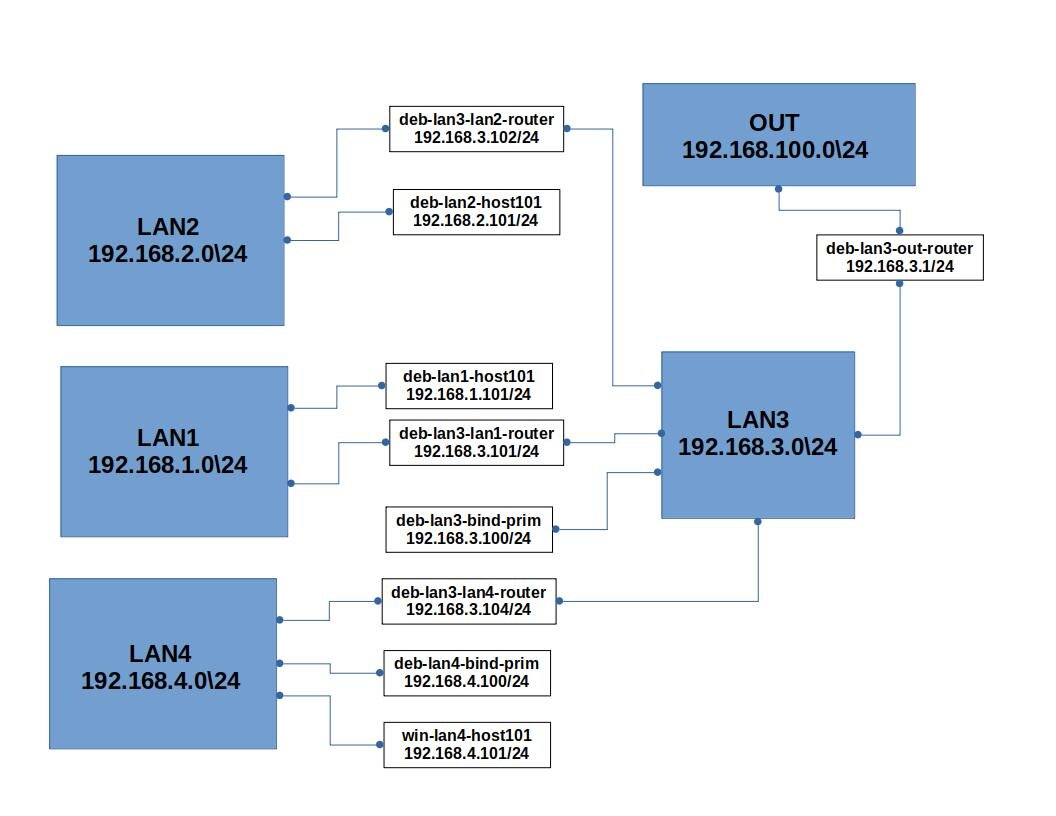
Здесь хост deb-lan3-bind-prim будет играть роль первичного DNS сервера, настройкой которого мы займёмся в следующей статье, пока просто настроим ему сеть, и выход в Internet.
Хосты сегмента LAN4 будем использовать позже, туда будем строить делегирование... надеюсь.
Собственно выход выполняется через хост deb-lan3-out-router, посредством настройки системы netfilter утилитой iptables. Настройка выполняется такими командами:
iptables -t nat -A POSTROUTING -o ens36 -j MASQUERADE
iptables -A FORWARD -o ens36 -j ACCEPT
Первая команда заклинания предписывает выполнить действие преобразования адресов источника (-j MASQUERADE)в таблице nat, цепочки POSTROUTING, для всех пакетов выходящих в интерфейс ens36(-o ens36 это внешний интерфейс сети).
Вторая команда заклинания предписывает пропускать (-j ACCEPT) все транзитные пакеты (-A FORWARD), которые выходят через интерфейс ens36 (-o ens36)
Обе описанные выше команды размещены в файле настройки сетевых интерфейсов с директивой post-up.
Приведу основные конфигурационные файлы хостов, которые отвечают за настройку сети.
deb-lan3-out-router
/etc/hostname
deb-lan3-out-router
/etc/network/interfaces
# This file describes the network interfaces available on your system
# and how to activate them. For more information, see interfaces(5).
source /etc/network/interfaces.d/*
# The loopback network interface
auto lo
iface lo inet loopback
auto ens33
iface ens33 inet static
address 192.168.3.1
netmask 255.255.255.0
post-up ip route add 192.168.1.0/24 dev ens33 via 192.168.3.101
post-up ip route add 192.168.2.0/24 dev ens33 via 192.168.3.102
post-up ip route add 192.168.4.0/24 dev ens33 via 192.168.3.104
auto ens36
iface ens36 inet dhcp
post-up iptables -t nat -A POSTROUTING -o ens36 -j MASQUERADE
post-up iptables -A FORWARD -o ens36 -j ACCEPT
deb-lan3-bind-prim
/etc/hostname
deb-lan3-bind-prim
/etc/network/interfaces
# This file describes the network interfaces available on your system
# and how to activate them. For more information, see interfaces(5).
source /etc/network/interfaces.d/*
# The loopback network interface
auto lo
iface lo inet loopback
auto ens33
iface ens33 inet static
address 192.168.3.100
netmask 255.255.255.0
gateway 192.168.3.1
deb-lan3-lan1-router
/etc/hostname
deb-lan3-lan1-router
/etc/network/interfaces
# This file describes the network interfaces available on your system
# and how to activate them. For more information, see interfaces(5).
source /etc/network/interfaces.d/*
# The loopback network interface
auto lo
iface lo inet loopback
auto ens33
iface ens33 inet static
address 192.168.3.101
netmask 255.255.255.0
gateway 192.168.3.1
auto ens36
iface ens36 inet static
address 192.168.1.1
netmask 255.255.255.0
post-up ip route add 192.168.2.0/24 dev ens33 via 192.168.3.102
post-up ip route add 192.168.4.0/24 dev ens33 via 192.168.3.104
deb-lan3-lan2-router
/etc/hostname
deb-lan3-lan2-router
/etc/network/interfaces
# This file describes the network interfaces available on your system
# and how to activate them. For more information, see interfaces(5).
source /etc/network/interfaces.d/*
# The loopback network interface
auto lo
iface lo inet loopback
auto ens33
iface ens33 inet static
address 192.168.3.102
netmask 255.255.255.0
gateway 192.168.3.1
auto ens36
iface ens36 inet static
address 192.168.2.1
netmask 255.255.255.0
post-up ip route add 192.168.1.0/24 dev ens33 via 192.168.3.101
post-up ip route add 192.168.4.0/24 dev ens33 via 192.168.3.104
deb-lan3-lan4-router
/etc/hostname
deb-lan3-lan4-router
/etc/network/interfaces
# This file describes the network interfaces available on your system
# and how to activate them. For more information, see interfaces(5).
source /etc/network/interfaces.d/*
# The loopback network interface
auto lo
iface lo inet loopback
auto ens33
iface ens33 inet static
address 192.168.3.104
netmask 255.255.255.0
gateway 192.168.3.1
auto ens36
iface ens36 inet static
address 192.168.4.1
netmask 255.255.255.0
post-up ip route add 192.168.1.0/24 dev ens33 via 192.168.3.101
post-up ip route add 192.168.2.0/24 dev ens33 via 192.168.3.102
deb-lan4-bind-prim
/etc/hostname
deb-lan4-bind-prim
/etc/network/interfaces
# This file describes the network interfaces available on your system
# and how to activate them. For more information, see interfaces(5).
source /etc/network/interfaces.d/*
# The loopback network interface
auto lo
iface lo inet loopback
auto ens33
iface ens33 inet static
address 192.168.4.100
netmask 255.255.255.0
gateway 192.168.4.1
deb-lan1-host101
/etc/hostname
deb-lan1-host101
/etc/network/interfaces
# This file describes the network interfaces available on your system
# and how to activate them. For more information, see interfaces(5).
source /etc/network/interfaces.d/*
# The loopback network interface
auto lo
iface lo inet loopback
auto ens33
iface ens33 inet static
address 192.168.1.101
netmask 255.255.255.0
gateway 192.168.1.1
deb-lan2-host101
/etc/hostname
deb-lan2-host101
/etc/network/interfaces
# This file describes the network interfaces available on your system
# and how to activate them. For more information, see interfaces(5).
source /etc/network/interfaces.d/*
# The loopback network interface
auto lo
iface lo inet loopback
auto ens33
iface ens33 inet static
address 192.168.2.101
netmask 255.255.255.0
gateway 192.168.2.1
deb-lan3-lan2-router
deb-lan3-lan1-router
deb-lan3-lan4-router
deb-lan3-out-router
/etc/ssh/sysctl.conf
...
net.ipv4.ip_forward=1
...
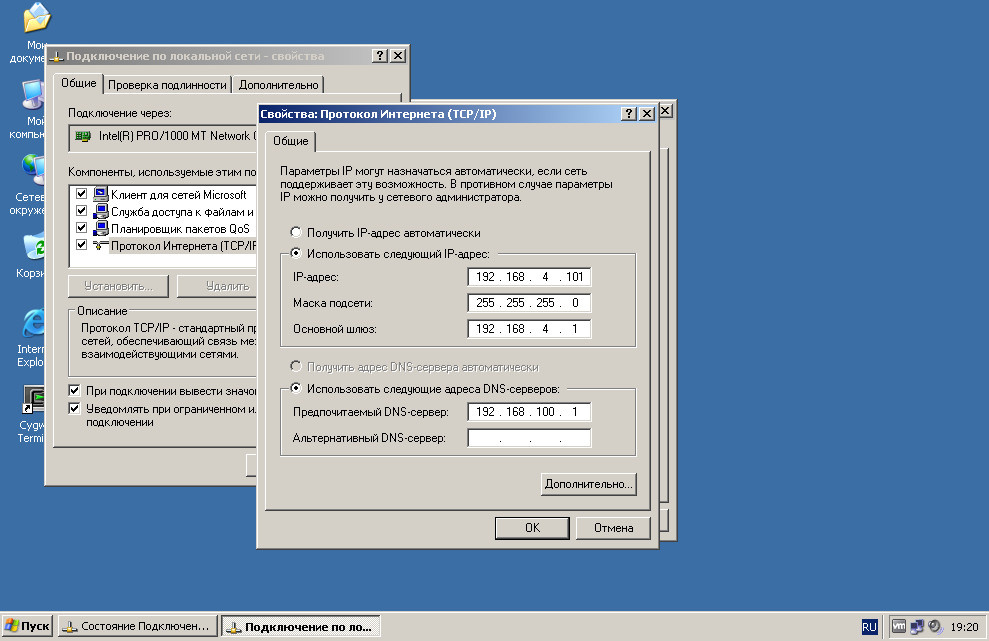
И наконец хост win-lan4-host101 имеет такие настройки
Благодарю всех Уважаемых Читателей, дочитавших до этого места.
Желаю всем удачи в начинаниях и продолжениях, до новых встреч!!!)
PS
Картинка на превью представляет аллюзию выхода в Интернет, и создана сетью Шедеврум.