Теперь нам нужно подготовить прочную основу для дальнейшей раскатки всего и вся в контейнерах. В будущем нам понадобятся:
- MySQL
- PostgreSQL
- PHPMyAdmin
- PgAdmin
- Nginx
- PHP-FPM
В этой части развернём MySQL.
Напоминаю, что сервер развёрнут и работает в timeweb.cloud, но вы можете использовать любой другой VPS.
Ставим MySQL
Начнём c установки MySQL. Создадим в директории /infra/ структуру поддиректорий:
mkdir -p /home/docker-admin/infra/mysql/service_folders/mysql2/wdir/
И отдельно - директорию для погрузки sql файлов для импорта:
mkdir -p /home/docker-admin/infra/sql_backups/mysql
Теперь в /home/docker-admin/infra/mysql/service_folders/mysql2/ положим 50-server.cnf следующего содержания:
#
# These groups are read by MariaDB server.
# Use it for options that only the server (but not clients) should see
# this is read by the standalone daemon and embedded servers
[server]
# this is only for the mysqld standalone daemon
[mysqld]
event_scheduler = on
default-time-zone='+03:00'
#
# * Basic Settings
#
#user = mysql
pid-file = /run/mysqld/mysqld.pid
basedir = /usr
#datadir = /var/lib/mysql
#tmpdir = /tmp
# Broken reverse DNS slows down connections considerably and name resolve is
# safe to skip if there are no "host by domain name" access grants
#skip-name-resolve
# Instead of skip-networking the default is now to listen only on
# localhost which is more compatible and is not less secure.
#bind-address = 127.0.0.1
#
# * Fine Tuning
#
#key_buffer_size = 128M
#max_allowed_packet = 1G
#thread_stack = 192K
#thread_cache_size = 8
# This replaces the startup script and checks MyISAM tables if needed
# the first time they are touched
#myisam_recover_options = BACKUP
#max_connections = 100
#table_cache = 64
#
# * Logging and Replication
#
# Both location gets rotated by the cronjob.
# Be aware that this log type is a performance killer.
# Recommend only changing this at runtime for short testing periods if needed!
#general_log_file = /var/log/mysql/mysql.log
#general_log = 1
# When running under systemd, error logging goes via stdout/stderr to journald
# and when running legacy init error logging goes to syslog due to
# /etc/mysql/conf.d/mariadb.conf.d/50-mysqld_safe.cnf
# Enable this if you want to have error logging into a separate file
#log_error = /var/log/mysql/error.log
# Enable the slow query log to see queries with especially long duration
#log_slow_query_file = /var/log/mysql/mariadb-slow.log
#log_slow_query_time = 10
#log_slow_verbosity = query_plan,explain
#log-queries-not-using-indexes
#log_slow_min_examined_row_limit = 1000
# The following can be used as easy to replay backup logs or for replication.
# note: if you are setting up a replication slave, see README.Debian about
# other settings you may need to change.
#server-id = 1
#log_bin = /var/log/mysql/mysql-bin.log
expire_logs_days = 10
#max_binlog_size = 100M
#
# * SSL/TLS
#
# For documentation, please read
# https://mariadb.com/kb/en/securing-connections-for-client-and-server/
#ssl-ca = /etc/mysql/cacert.pem
#ssl-cert = /etc/mysql/server-cert.pem
#ssl-key = /etc/mysql/server-key.pem
#require-secure-transport = on
#
# * Character sets
#
# MySQL/MariaDB default is Latin1, but in Debian we rather default to the full
# utf8 4-byte character set. See also client.cnf
character-set-server = utf8mb4
collation-server = utf8mb4_general_ci
#
# * InnoDB
#
# InnoDB is enabled by default with a 10MB datafile in /var/lib/mysql/.
# Read the manual for more InnoDB related options. There are many!
# Most important is to give InnoDB 80 % of the system RAM for buffer use:
# https://mariadb.com/kb/en/innodb-system-variables/#innodb_buffer_pool_size
#innodb_buffer_pool_size = 8G
# this is only for embedded server
[embedded]
# This group is only read by MariaDB servers, not by MySQL.
# If you use the same .cnf file for MySQL and MariaDB,
# you can put MariaDB-only options here
[mariadb]
# This group is only read by MariaDB-10.11 servers.
# If you use the same .cnf file for MariaDB of different versions,
# use this group for options that older servers don't understand
[mariadb-10.11]
А в /home/docker-admin/infra/mysql/ создадим docker-compose.yml:
version: '3.9'
services:
db_main:
image: mariadb:10.11.3
tty: true
deploy:
replicas: 1
resources:
limits:
cpus: "0.5"
memory: 1G
reservations:
memory: 512M
restart_policy:
condition: on-failure
delay: 5s
max_attempts: 3
window: 120s
placement:
constraints:
- node.role == manager
healthcheck:
test: ["CMD", "healthcheck.sh", "--connect"]
start_period: 10s
interval: 10s
timeout: 5s
retries: 3
environment:
TZ: "Europe/Moscow"
MYSQL_ROOT_PASSWORD: <пароль рута>
MYSQL_DATABASE: <БД по умолчанию, создастся автоматом>
MYSQL_USER: <пользователь БД, создастся автоматом>
MYSQL_PASSWORD: <пароль пользователя БД, создастся автоматом>
volumes:
- type: bind
source: ./service_folders/mysql2/wdir
target: /var/lib/mysql
- type: bind
source: /home/docker-admin/infra/sql_backups/mysql
target: /var/tmp_import
- type: bind
source: ./service_folders/mysql2/50-server.cnf
target: /etc/mysql/mariadb.conf.d/50-server.cnf
- type: bind
source: /mnt/disk1
target: /var/backup
networks:
- portainer_composite_nw
ports:
- target: 3306
published: 3306
mode: host
networks:
portainer_composite_nw:
external: true
Обратите внимание, в блоке resources мы ограничиваем наш контейнер по CPU и памяти, чтобы он не скушал ресурсы всего сервера. В остальном настройка стандартная. В частности бекапы монтируем сразу в /mnt/disk1
Реплику запускаем одну, том монтируем в корневую ФС-сервера (я буду делать так почти всегда, банально из соображений удобства, при этом учтите что это лишает контейнеры одной из ключевых особенностей - изоляция на уровне файловой системы, если для вас это критично, например, контейнеры раскатываются для очень серьёзного промышленного окружения, так делать не следует).
Также стандартным healthcheck.sh (есть в контейнере) мы настраиваем хелсчек для того чтобы оркестратор мог в случае проблем с контейнером автоматически его перезапускать и реализовывать ещё ряд удобных механик управления средой исполнения.
Подготовления завершены, можем запускать новый од командой:
sudo docker stack deploy -c /home/docker-admin/infra/mysql/docker-compose.yml mysql

Если после запуска контейнер не появился в списке контейнеров portainer, то что-то явно пошло не так
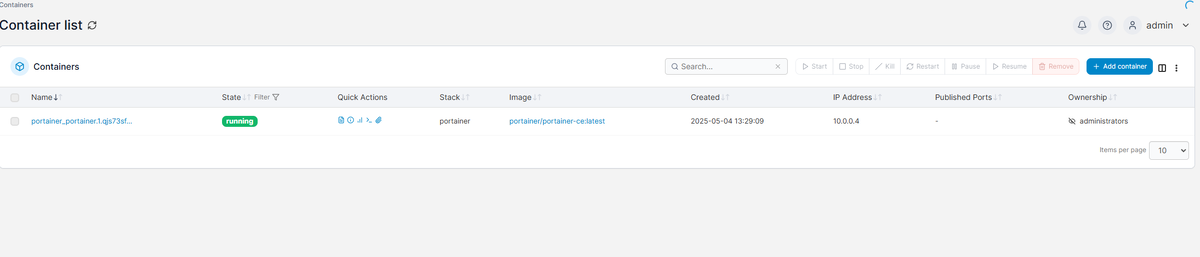
Чтобы понять, что не так, переходим в Stacks->mysql:
В деталях видно, что контейнер падает ошибку, при клике на любую ошибочную задачу, можем посмотреть её содержимое:
В данном случае я просто забыл создать файл 50-server.cnf. После исправления всё заработало.
Что я сделал для исправления? Создал файл, а затем удалил и заново создал стек:
sudo docker stack rm mysql
sudo docker stack deploy -c /home/docker-admin/infra/mysql/docker-compose.yml mysql
На этом всё, в следующей части по аналогии развернём PostgreSQL.