Node.js is a powerful JavaScript runtime built on Chrome’s V8 engine, allowing developers to build scalable network applications. Together with Node Package Manager (NPM), which is the default package manager for Node.js, developers can manage dependencies and publish their packages.
This article provides a complete guide to installing Node.js and NPM on OpenBSD systems, ensuring that developers can get their Node.js projects up and running efficiently.
1. System Specifications
root@ns2.datainchi.com
OS: OpenBSD 7.6 amd64
Host: Acer Aspire M1800
Uptime: 8 mins
Packages: 42 (pkg_info)
Shell: ksh v5.2.14 99/07/13.2
Terminal: /dev/ttyp0
CPU: Intel Core 2 Duo E8400 (2) @ 3.000GHz
Memory: 35MiB / 1775MiB
IP Address: 192.168.5.3
Versi NPM: 11.1.0
Versi Node.JS: v20.18.2
Versi Python: python-3.11.10p1
2. What is Node.js
Think of Node.js as your constant companion in your programming adventure, not just any character in your story, but a key ally that brings your innovative ideas to life from the conventional web of narratives. It’s like discovering a hidden path that suddenly opens up, allowing you to build responsive and dynamic applications like the plot of a mystery novel.
Node.js has the unique ability to transform the complex into the achievable, making developing applications not just a possibility, but also an enjoyable journey.
Keep reading to learn more about Node.js, where every line of code you write helps unlock the potential of your project in the vast world of programming.
3. Node.js Architecture
Node.JS excels at efficiently managing a large number of concurrent connections and data-intensive tasks. Node.JS is ideal for tasks that involve fast processing of large amounts of data. However, Node.JS is less suitable for computationally intensive tasks that require significant CPU resources. In such cases, the single-threaded nature of Node.JS can cause delays in responding to other requests.
To better illustrate this concept, imagine a coffee shop/cafe. In a multi-process configuration, each client (application server) is served by a different barista (thread). If all the baristas are busy, new customers will arrive in anticipation.
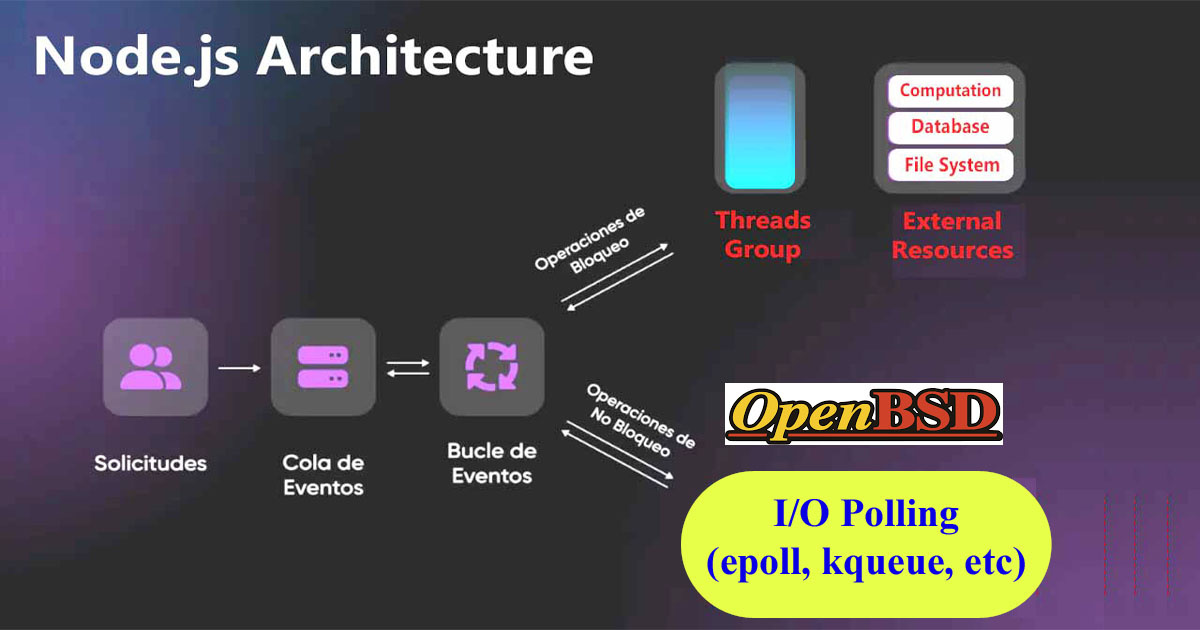
In contrast, Node.JS is like a coffee shop with a very efficient barista. The barista processes orders quickly and in a continuous flow, much like Node.JS handles requests using non-blocking I/O operations.
However, complex orders in this setup are CPU intensive, and Node.JS is very labor intensive in managing this task. Node.JS requires more of the barista’s time, slowing down service to others. This shows you how Node.JS, while great for fast, multi-threaded applications, can struggle with tasks that consume a lot of CPU and memory.
The difference between single-threaded and multi-processed is simple: a single-threaded architecture can run and scale up faster than a multi-process configuration. This is what Ryan Dahl had in mind when he created Node.JS.
4. Installing Node.JS and NPM
After you know a little about what Node.JS is, we continue by installing Node.JS. It is very different from other operating systems such as FreeBSD. The Node.JS installation process on OpenBSD is very easy.
Before we start installing Node.JS, we should first install the Node.JS dependencies. There are several dependencies that you must install and one of the most important dependencies is Python.
Install dependencies
ns2# pkg_add python
ns2# pkg_add flock gmake
ns2# pkg_add gcc g++ llvm py3-llvm gas
After all your dependencies are installed, then we continue by installing Node.JS.
Install node.js
ns2# pkg_add node
After you have successfully installed Node.JS, we continue by checking the version of the application. This is to ensure whether Node.JS has been installed or not on your OpenBSD system.
Check NPM and node versions
ns2# node -v
v20.18.2
ns2# npm -v
11.1.0
At this point you have successfully installed Node.JS on OpenBSD. Now your Node.JS is ready to be used to create various applications.
5. Example of Using Node.JS and NPM
To complete this article, we will provide a few examples of how to use NPM and Node.JS on OpenBSD.
Update openbsd packages
ns2# npm i @esbuild/openbsd-x64
Even though npm is included in the Node.js installation, npm updates more frequently than Node.js, so you should always update to the latest version!.
Update NPM
ns2# npm install npm@latest -g
ns2# npm update -g npm
Update node.js
ns2# npm install -g node@latest --force
With Node.js and NPM installed on your OpenBSD 7.6 system, you are now ready to start building applications with Node.js. Remember to always update your Node.js and NPM versions, so you can take advantage of the latest features and security updates. If you find managing Node.js infrastructure challenging, keep learning and diligently reading articles about node.js.