2, 3 и даже более операторов на MikroTik RouterOS 7 с рекурсивной маршрутизацией и дополнительной проверкой с помощью Netwatch, а так же отработкой динамических адресов от оператора.
Отличается от настройки для RouerOS 6, но принцип остается прежним.
В данном сценарии будет подключен резервный провайдер с автоматически переключением в случае отказа основного Интернета. Причем гостевой трафик можно пустить через запасного провайдера, чтобы не грузить основного, а так же публикации можно делать сразу через двух.
MikroTik 2WAN или MultiWAN с резервом
Table of Contents
Таблицы маршрутизации
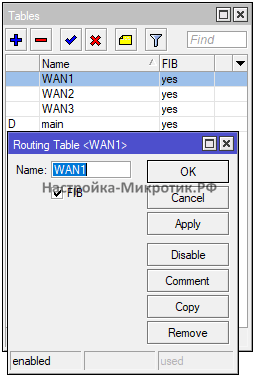
/routing table
add disabled=no fib name=WAN1
add disabled=no fib name=WAN2
add disabled=no fib name=WAN3
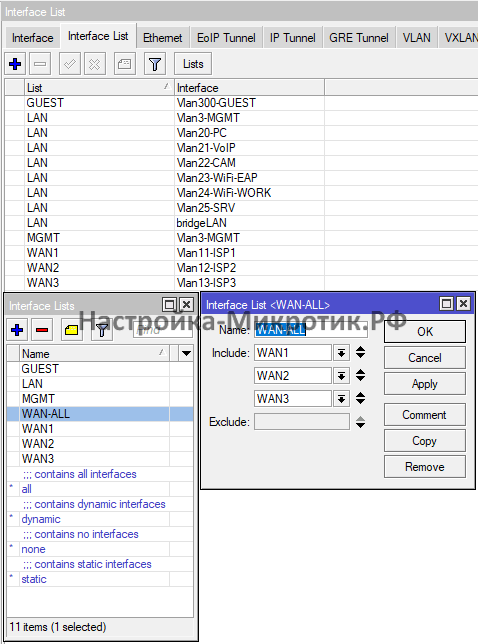
Интерфейс листы
Собираем порты в листы
Маркировка трафика
/ip firewall mangle
add action=mark-connection chain=prerouting comment="Mark Connection WAN1" connection-mark=no-mark in-interface-list=WAN1 new-connection-mark=con-WAN1 passthrough=yes
add action=mark-connection chain=prerouting comment="Mark Connection WAN2" connection-mark=no-mark in-interface-list=WAN2 new-connection-mark=con-WAN2 passthrough=yes
add action=mark-connection chain=prerouting comment="Mark Connection WAN3" connection-mark=no-mark in-interface-list=WAN3 new-connection-mark=con-WAN3 passthrough=yes
add action=mark-routing chain=prerouting comment="Mark Routing !WAN" connection-mark=con-WAN1 in-interface-list=!WAN-ALL new-routing-mark=WAN1 passthrough=yes
add action=mark-routing chain=prerouting comment="Mark Routing !WAN" connection-mark=con-WAN2 in-interface-list=!WAN-ALL new-routing-mark=WAN2 passthrough=yes
add action=mark-routing chain=prerouting comment="Mark Routing !WAN" connection-mark=con-WAN3 in-interface-list=!WAN-ALL new-routing-mark=WAN3 passthrough=yes
add action=mark-routing chain=output comment="Mark Roution Out WAN1" connection-mark=con-WAN1 new-routing-mark=WAN1 passthrough=yes
add action=mark-routing chain=output comment="Mark Roution Out WAN2" connection-mark=con-WAN2 new-routing-mark=WAN2 passthrough=yes
add action=mark-routing chain=output comment="Mark Roution Out WAN3" connection-mark=con-WAN3 new-routing-mark=WAN3 passthrough=yes
Рекурсивная маршрутизация
Замените в конфигурации:
- 79.174.41.129 на шлюз оператора 1
- 80.76.108.1 на шлюз оператора 2
- 192.168.199.1 на шлюз оператора 3
/ip route
add comment="Table WAN1" disabled=no distance=1 dst-address=0.0.0.0/0 gateway=79.174.41.129 routing-table=WAN1 scope=30 target-scope=10
add comment="Table WAN2" disabled=no distance=1 dst-address=0.0.0.0/0 gateway=80.76.108.1 routing-table=WAN2 scope=30 target-scope=10
add comment="Table WAN3" disabled=no distance=1 dst-address=0.0.0.0/0 gateway=192.168.199.1 routing-table=WAN3 scope=30 target-scope=10
add comment=WAN1_!_Recursive disabled=no distance=1 dst-address=4.2.2.1/32 gateway=79.174.41.129 routing-table=main scope=11 target-scope=10
add comment=WAN2_!_Recursive disabled=no distance=1 dst-address=4.2.2.2/32 gateway=80.76.108.1 routing-table=main scope=11 target-scope=10
add comment=WAN3_!_Recursive disabled=no distance=1 dst-address=4.2.2.3/32 gateway=192.168.199.1 routing-table=main scope=11 target-scope=10
add comment=WAN1_Recursive disabled=no distance=10 dst-address=0.0.0.0/0 gateway=4.2.2.1 routing-table=main scope=30 target-scope=11
add check-gateway=ping comment=WAN2_Recursive disabled=no distance=20 dst-address=0.0.0.0/0 gateway=4.2.2.2 routing-table=main scope=30 target-scope=11
add comment=WAN3_Recursive disabled=no distance=30 dst-address=0.0.0.0/0 gateway=4.2.2.3 routing-table=main scope=30 target-scope=11
Правила маршрутизации
Замените в конфигурации
- 79.174.41.168 на IP оператора 1
- 80.76.108.127 на IP оператора 2
- 192.168.199.84 на IP оператора 3
/routing rule
add action=lookup comment=Route_Only_WAN1 disabled=no src-address=79.174.41.168 table=WAN1
add action=lookup disabled=no dst-address=77.88.8.1/32 table=WAN1
add action=lookup disabled=no routing-mark=WAN1 table=WAN1
add action=lookup comment=Route_Only_WAN2 disabled=no src-address=80.76.108.127/32 table=WAN2
add action=lookup disabled=no dst-address=77.88.8.2/32 table=WAN2
add action=lookup disabled=no routing-mark=WAN2 table=WAN2
add action=lookup comment=Route_Only_WAN3 disabled=no src-address=192.168.199.84 table=WAN3
add action=lookup disabled=no dst-address=77.88.8.3/32 table=WAN3
add action=lookup disabled=no routing-mark=WAN3 table=WAN3
Автоматическая подставка IP адреса
В случаях динамического IP
Для WAN3
/system script
add dont-require-permissions=no name=Vlan11-ISP1 owner=WinBox policy=ftp,reboot,read,write,policy,test,password,sniff,sensitive,romon source=":local WANDHCP Vlan11-ISP1;\r\
\n\r\
\nlocal result [/ip address get value-name=address [find interface=\$WANDHCP]];\r\
\nlocal WANDHCPIP [:pick \$result 0 [:find \$result \"/\"]];\r\
\nlocal WANDHCPGW [/ip address get value-name=network [find interface=\$WANDHCP]];\r\
\n\r\
\n/routing rule set [find comment=\"Route_Only_WAN1\"] src-address=\$WANDHCPIP;"
Для WAN1
/system script
add dont-require-permissions=no name=Vlan13-ISP3 owner=WinBox policy=ftp,reboot,read,write,policy,test,password,sniff,sensitive,romon source=":local WANDHCP Vlan13-ISP3;\r\
\n\r\
\nlocal result [/ip address get value-name=address [find interface=\$WANDHCP]];\r\
\nlocal WANDHCPIP [:pick \$result 0 [:find \$result \"/\"]];\r\
\nlocal WANDHCPGW [/ip address get value-name=network [find interface=\$WANDHCP]];\r\
\n\r\
\n/routing rule set [find comment=\"Route_Only_WAN3\"] src-address=\$WANDHCPIP;"
И указываем это в DHCP-Client интерфейса
Получить IP и шлюз на DHCP MikroTik
Проверка интернета
/tool netwatch
add comment=Check_WAN1 disabled=no down-script="/ip route set [find comment=\"WAN1_Recursive\"] check-gateway=ping" host=8.8.8.8 http-codes="" test-script="" type=simple up-script="/ip route unset [find comment=\"WAN1_Recursive\"] check-gateway"
add comment=Check_WAN2 disabled=no down-script="/ip route set [find comment=\"WAN2_Recursive\"] check-gateway=ping" host=77.88.8.2 http-codes="" test-script="" type=simple up-script="/ip route unset [find comment=\"WAN2_Recursive\"] check-gateway"
add comment=Check_WAN3 disabled=no down-script="/ip route set [find comment=\"WAN3_Recursive\"] check-gateway=ping" host=77.88.8.3 http-codes="" test-script="" type=simple up-script="/ip route unset [find comment=\"WAN3_Recursive\"] check-gateway"
Проверка включает или выключает Check Gateway
Так же можно сменить тип на ICMP и мониторить потери:
Ручное управление
Переключение между операторами
/system script
add dont-require-permissions=no name=WAN1>WAN2>WAN3 owner=WinBox policy=ftp,reboot,read,write,policy,test,password,sniff,sensitive,romon source=":local result 0;\r\
\n\r\
\n:set result [/ip route get [find comment=\"WAN3_Recursive\"] distance]\r\
\nif (\$result != 30) do={\r\
\n /ip route set [find comment=\"WAN3_Recursive\"] distance=30;\r\
\n}\r\
\n\r\
\n:set result [/ip route get [find comment=\"WAN2_Recursive\"] distance]\r\
\nif (\$result != 20) do={\r\
\n /ip route set [find comment=\"WAN2_Recursive\"] distance=20;\r\
\n}\r\
\n\r\
\n:set result [/ip route get [find comment=\"WAN1_Recursive\"] distance]\r\
\nif (\$result != 10) do={\r\
\n /ip route set [find comment=\"WAN1_Recursive\"] distance=10;\r\
\n}"
add dont-require-permissions=no name=WAN1>WAN3>WAN2 owner=WinBox policy=ftp,reboot,read,write,policy,test,password,sniff,sensitive,romon source=":local result 0;\r\
\n\r\
\n:set result [/ip route get [find comment=\"WAN2_Recursive\"] distance]\r\
\nif (\$result != 20) do={\r\
\n /ip route set [find comment=\"WAN2_Recursive\"] distance=30;\r\
\n}\r\
\n\r\
\n:set result [/ip route get [find comment=\"WAN3_Recursive\"] distance]\r\
\nif (\$result != 30) do={\r\
\n /ip route set [find comment=\"WAN3_Recursive\"] distance=20;\r\
\n}\r\
\n\r\
\n:set result [/ip route get [find comment=\"WAN1_Recursive\"] distance]\r\
\nif (\$result != 10) do={\r\
\n /ip route set [find comment=\"WAN1_Recursive\"] distance=10;\r\
\n}"
add dont-require-permissions=no name=WAN2>WAN1>WAN3 owner=WinBox policy=ftp,reboot,read,write,policy,test,password,sniff,sensitive,romon source=":local result 0;\r\
\n\r\
\n:set result [/ip route get [find comment=\"WAN3_Recursive\"] distance]\r\
\nif (\$result != 30) do={\r\
\n /ip route set [find comment=\"WAN3_Recursive\"] distance=30;\r\
\n}\r\
\n\r\
\n:set result [/ip route get [find comment=\"WAN1_Recursive\"] distance]\r\
\nif (\$result != 20) do={\r\
\n /ip route set [find comment=\"WAN1_Recursive\"] distance=20;\r\
\n}\r\
\n\r\
\n:set result [/ip route get [find comment=\"WAN2_Recursive\"] distance]\r\
\nif (\$result != 10) do={\r\
\n /ip route set [find comment=\"WAN2_Recursive\"] distance=10;\r\
\n}"
add dont-require-permissions=no name=WAN2>WAN3>WAN1 owner=WinBox policy=ftp,reboot,read,write,policy,test,password,sniff,sensitive,romon source=":local result 0;\r\
\n\r\
\n:set result [/ip route get [find comment=\"WAN1_Recursive\"] distance]\r\
\nif (\$result != 30) do={\r\
\n /ip route set [find comment=\"WAN1_Recursive\"] distance=30;\r\
\n}\r\
\n\r\
\n:set result [/ip route get [find comment=\"WAN3_Recursive\"] distance]\r\
\nif (\$result != 20) do={\r\
\n /ip route set [find comment=\"WAN3_Recursive\"] distance=20;\r\
\n}\r\
\n\r\
\n:set result [/ip route get [find comment=\"WAN2_Recursive\"] distance]\r\
\nif (\$result != 10) do={\r\
\n /ip route set [find comment=\"WAN2_Recursive\"] distance=10;\r\
\n}"
add dont-require-permissions=no name=WAN3>WAN1>WAN2 owner=WinBox policy=ftp,reboot,read,write,policy,test,password,sniff,sensitive,romon source=":local result 0;\r\
\n\r\
\n:set result [/ip route get [find comment=\"WAN2_Recursive\"] distance]\r\
\nif (\$result != 30) do={\r\
\n /ip route set [find comment=\"WAN2_Recursive\"] distance=30;\r\
\n}\r\
\n\r\
\n:set result [/ip route get [find comment=\"WAN1_Recursive\"] distance]\r\
\nif (\$result != 20) do={\r\
\n /ip route set [find comment=\"WAN1_Recursive\"] distance=20;\r\
\n}\r\
\n\r\
\n:set result [/ip route get [find comment=\"WAN3_Recursive\"] distance]\r\
\nif (\$result != 10) do={\r\
\n /ip route set [find comment=\"WAN3_Recursive\"] distance=10;\r\
\n}"
add dont-require-permissions=no name=WAN3>WAN2>WAN1 owner=WinBox policy=ftp,reboot,read,write,policy,test,password,sniff,sensitive,romon source=":local result 0;\r\
\n\r\
\n:set result [/ip route get [find comment=\"WAN1_Recursive\"] distance]\r\
\nif (\$result != 30) do={\r\
\n /ip route set [find comment=\"WAN3_Recursive\"] distance=30;\r\
\n}\r\
\n\r\
\n:set result [/ip route get [find comment=\"WAN2_Recursive\"] distance]\r\
\nif (\$result != 20) do={\r\
\n /ip route set [find comment=\"WAN2_Recursive\"] distance=20;\r\
\n}\r\
\n\r\
\n:set result [/ip route get [find comment=\"WAN3_Recursive\"] distance]\r\
\nif (\$result != 10) do={\r\
\n /ip route set [find comment=\"WAN3_Recursive\"] distance=10;\r\
\n}"
Сброс соединений через оператора
/system script
add dont-require-permissions=no name=Reset_Conn_WAN1 owner=WinBox policy=ftp,reboot,read,write,policy,test,password,sniff,sensitive,romon source="/ip firewall connection remove [find connection-mark=\"con-WAN1\"]"
add dont-require-permissions=no name=Reset_Conn_WAN2 owner=WinBox policy=ftp,reboot,read,write,policy,test,password,sniff,sensitive,romon source="/ip firewall connection remove [find connection-mark=\"con-WAN2\"]"
add dont-require-permissions=no name=Reset_Conn_WAN3 owner=WinBox policy=ftp,reboot,read,write,policy,test,password,sniff,sensitive,romon source="/ip firewall connection remove [find connection-mark=\"con-WAN3\"]"
Отключение проверки Check Gatweay
/system script
add dont-require-permissions=no name=check-gateway_OFF owner=WinBox policy=ftp,reboot,read,write,policy,test,password,sniff,sensitive,romon source=\
"/ip route unset [find comment=\"WAN1_Recursive\"] check-gateway\r\
\n/ip route unset [find comment=\"WAN2_Recursive\"] check-gateway\r\
\n/ip route unset [find comment=\"WAN3_Recursive\"] check-gateway"
Блокировка проверки с другого оператора
/ip firewall address-list
add address=4.2.2.1 list=Only_WAN1
add address=4.2.2.2 list=Only_WAN2
add address=4.2.2.3 list=Only_WAN3
add address=77.88.8.1 list=Only_WAN1
add address=77.88.8.2 list=Only_WAN2
add address=77.88.8.3 list=Only_WAN3
/ip firewall filter
add action=drop chain=output comment="Only WAN1" dst-address-list=Only_WAN1 out-interface-list=!WAN1
add action=drop chain=output comment="Only WAN2" dst-address-list=Only_WAN2 out-interface-list=!WAN2
add action=drop chain=output comment="Only WAN3" dst-address-list=Only_WAN3 out-interface-list=!WAN3
Ограниченный доступ к резервному оператору на MikroTik
СЕТЕВЫЕ УСЛУГИ
- Настройка
- Мониторинг
- Консультация
- Подбор оборудования
- Telegram: @Engineer_MikroTik
- Все услуги без предоплаты
- Работаю с юридическими и физическими лицами