Hello, today i am going to help you to connect platform TigerTrage and show how to create a workspace.
As for first you need to register on TigerTrade website.
Create API keys clicking on the folder above. Then click the button “New API key” and follow the instruction. Add both Spot and Futures.
Remember API key and secret Key (especially, because will not be able to see it again). I recommend writing somewhere down.

Download TigerTrade from the official website.
Now you need to link platform to TigerTrade Broker using your API. Find folder named "file", then "connections" and click on "setup".
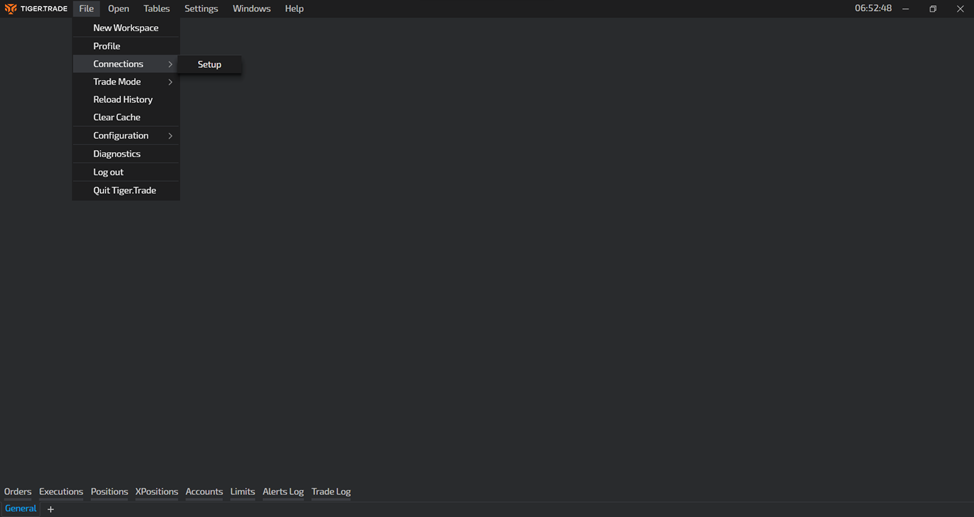
A window will pop up suggesting you create a new connection.
Then make two separate connections for both Spot and Futures (you may use same API)
Now let’s move further to creation of workspace.
We will add DOM (depth of market) for both futures and spot and charts for both as well.
Click on folder "open" and add DOM to your workspace. Repeat this twice.
Drag the tag of second window and attach it on the right side as shown on the picture.
Do the same with charts but this time put second chart below the first one.
Now choose the coin you want to trade
And assign same colour to all DOMs and charts to link them(the square button near the tag with a crossline) .
Now click the new button near coin tag to switch the market type. (F=Futures, S=Spot)
Congratulations, now you have created your workspace.