Данная стать будет полезна, если:
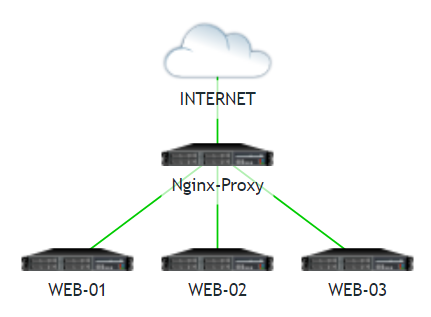
- Нужно разнести несколько WЕB-сайтов на разные сервера, но имеется всего 1 внешний IP-адрес
- Из соображений безопасности
- Надоело гемороиться с выпуском халявных сертификатов на каждом WEB-сервере, сделать процесс автоматическим
- Этот пункт для ваших фантазий
Подготавливаем CentOS 8 как я рассказывал ТУТ
Установим Nginx и Cetbot
# yum -y install nginx certbot
Весь смысл Nginx-Proxy, что при обращении к нему по определенному доменному имени, запрос редиректится на сервак где крутится необходимый сайт.
Создадим конфиг для виртуального хоста c редиректом по протоколу HTTP
# nano /etc/nginx/conf.d/mysite.net.conf
server {
listen 80;
server_name mysite.net; # Фактическое доменное имя
location /.well-known/acme-challenge/ {
root /tmp;
}
location / {
proxy_pass http://10.10.10.11:80; # Адрес Web-сервера за нашим Nginx-Proxy
proxy_set_header Host $host;
proxy_set_header X-Forwarded-For $proxy_add_x_forwarded_for;
proxy_set_header X-Real-IP $remote_addr;
proxy_set_header X-Forwarded-Proto http;
}
}
Выпустим сертификат Let's Encrypt и сделаем редирект по HTTPS
# systemctl stop nginx
# certbot certonly
Saving debug log to /var/log/letsencrypt/letsencrypt.log
How would you like to authenticate with the ACME CA?
- - - - - - - - - - - - - - - - - - - - - - - - - - - - - - - - - - - - - - - -
1: Spin up a temporary webserver (standalone)
2: Place files in webroot directory (webroot)
- - - - - - - - - - - - - - - - - - - - - - - - - - - - - - - - - - - - - - - -
Select the appropriate number [1-2] then [enter] (press 'c' to cancel): 1
Enter email address (used for urgent renewal and security notices)
(Enter 'c' to cancel): mail@mail.ru
- - - - - - - - - - - - - - - - - - - - - - - - - - - - - - - - - - - - - - - -
Please read the Terms of Service at
https://letsencrypt.org/documents/LE-SA-v1.3-September-21-2022.pdf. You must
agree in order to register with the ACME server. Do you agree?
- - - - - - - - - - - - - - - - - - - - - - - - - - - - - - - - - - - - - - - -
(Y)es/(N)o: y
- - - - - - - - - - - - - - - - - - - - - - - - - - - - - - - - - - - - - - - -
Would you be willing, once your first certificate is successfully issued, to
share your email address with the Electronic Frontier Foundation, a founding
partner of the Let's Encrypt project and the non-profit organization that
develops Certbot? We'd like to send you email about our work encrypting the web,
EFF news, campaigns, and ways to support digital freedom.
- - - - - - - - - - - - - - - - - - - - - - - - - - - - - - - - - - - - - - - -
(Y)es/(N)o: y
Account registered.
Please enter the domain name(s) you would like on your certificate (comma and/or space separated) (Enter 'c' to cancel): mysite.net
Successfully received certificate.
Certificate is saved at: /etc/letsencrypt/live/mysite.net/fullchain.pem
Key is saved at: /etc/letsencrypt/live/mysite.net/privkey.pem
This certificate expires on 2023-07-17.
These files will be updated when the certificate renews.
Certbot has set up a scheduled task to automatically renew this certificate in the background.
- - - - - - - - - - - - - - - - - - - - - - - - - - - - - - - - - - - - - - - -
If you like Certbot, please consider supporting our work by:
* Donating to ISRG / Let's Encrypt: https://letsencrypt.org/donate
* Donating to EFF: https://eff.org/donate-le
- - - - - - - - - - - - - - - - - - - - - - - - - - - - - - - - - - - - - - - -
Сертификат выпущен
Переписываем конфиг виртуального хоста
server {
listen 443 ssl http2;
server_name mysite.net;
access_log /var/log/nginx/mysite.net-access.log;
error_log /var/log/nginx/mysite.net-error.log;
ssl_certificate /etc/letsencrypt/live/mysite.net/fullchain.pem;
ssl_certificate_key /etc/letsencrypt/live/mysite.net/privkey.pem;
location /.well-known/acme-challenge/ {
root /tmp;
}
location / {
proxy_pass http://10.10.10.11:80;
proxy_set_header Host $host;
proxy_set_header X-Forwarded-For $proxy_add_x_forwarded_for;
proxy_set_header X-Real-IP $remote_addr;
proxy_set_header X-Forwarded-Proto https;
}
}
server {
listen 80;
server_name mysite.net;
return 301 https://mysite.net$request_uri;
}
# systemctl start nginx
Автоматизируем перевыпуск сертификата с помощью Crontab
# nano /etc/crontab
# Let's Encrypt
30 2 * * * root /usr/bin/certbot renew --post-hook "nginx -s reload" >> /var/log/le-renew.log
Дополнительные настройки Nginx
Редактируем конфиг
#sudo nano /etc/nginx/nginx.conf
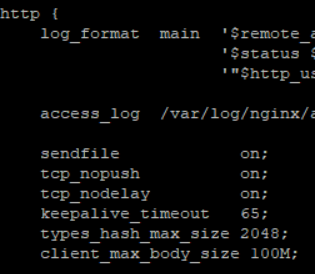
Увеличение размер тела запроса и загружаемых файлов
Вписываем строчку в секцию http: client_max_body_size 100M
Проверяем конфигурацию на ошибки и перезапускаем Nginx
# nginx -t
# systemctl reload nginx