Найти в Дзене

100% way to display an image from a computer on the screen of a graphic tablet (Short text version).

((перевод моей статьи на английский язык для тех кто не знает русского, потому что проблема с этими планшетами имеет планетарный масштаб и не ограничивается одной страной, а я не публикуюсь на других платформах. перевод через сервис гугл, но с правками автора))
(translation of my article into English for those who do not know Russian, because the problem with these tablets is of a planetary scale and is not limited to one country, and I do not publish on other platforms. translation via Google service, but with the author's edits)
For those who like to read or do not want to watch a long boring video - here is briefly and to the point (with pictures^^): The essence of the method is the presence of a hardware adapter between the computer and the tablet, which makes these devices friends with each other :3 1) buy an adapter - from the equipment tested at the moment, this is a Chinese "external capture card with a USB port" that has: two HDMI connectors (input and output), one USB port a

((перевод моей статьи на английский язык для тех кто не знает русского, потому что проблема с этими планшетами имеет планетарный масштаб и не ограничивается одной страной, а я не публикуюсь на других платформах. перевод через сервис гугл, но с правками автора))
(translation of my article into English for those who do not know Russian, because the problem with these tablets is of a planetary scale and is not limited to one country, and I do not publish on other platforms. translation via Google service, but with the author's edits)

For those who like to read or do not want to watch a long boring video - here is briefly and to the point (with pictures^^):

The essence of the method is the presence of a hardware adapter between the computer and the tablet, which makes these devices friends with each other :3

1) buy an adapter - from the equipment tested at the moment, this is a Chinese "external capture card with a USB port" that has: two HDMI connectors (input and output), one USB port and two 3.5 mm jacks (headphones and microphone) - see the picture. in this configuration, it definitely works. a budget adapter costs about £12-15 and is sold on marketplaces.
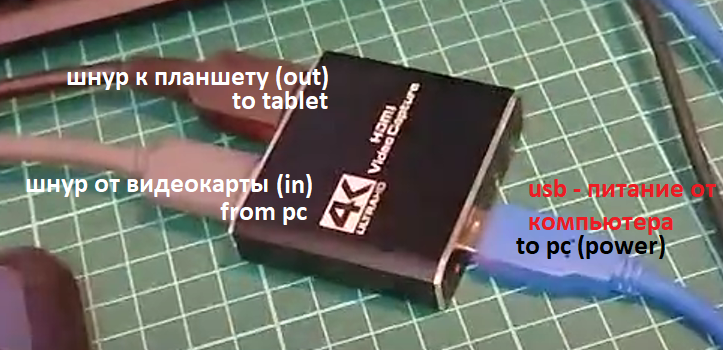
the appearance of the adapter and the connection procedure (follow the port signatures on the device)

2) connect this Chinese box to the computer via USB (providing it with power), and connect the cable from the computer's video card to the HDMI input connector (HDMI in / video in) (thus feeding the image from the computer to this device).

3) connect the tablet cable in accordance with the "user manual", but plug the HDMI plug into the output connector of the box (HDMI out / video out) instead of the computer's video card.

everything should start working. you can install drivers if they are not installed yet.
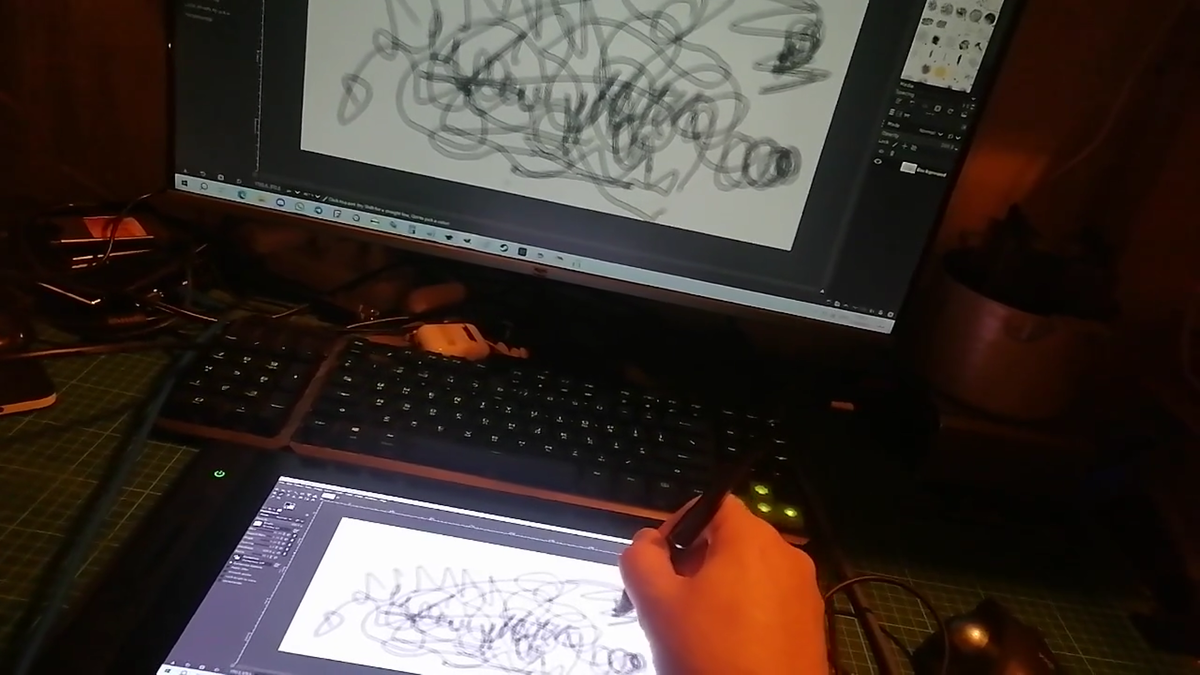
the tablet works through the video capture box - in screen duplication mode, but you can choose another mode.
the box through which the tablet screen is connected against the background of the tablet itself
the solution does not require drivers and works even at the BIOS stage!
the "video capture card" box itself, connected to a computer even without a monitor, is defined as a monitor and allows you to adjust the scale, resolution, orientation and operating mode. for obvious reasons, you can't adjust only the color profile of the device (because it's not a monitor), but you can adjust the color settings of windows hd color.

I hope this article was useful to you. ^^
please publish a copy of this article somewhere where English is the language of publication, since this version of the article may be removed from this resource as a duplicate in a foreign language. the author's (me) goal is to bring a solution to people who need it, and not anything else, so do not worry about the copyright issue. I allow you to freely copy and distribute this article or create your own content based on it.