The easiest way of configuring MikroTik hAP ac2 (RouterOS 7) as a VPN client.
We have:
1. MikroTik router that we want to configure as a client
2. VPS that we want to configure as WireGuard VPN server.
- Create a regular client's config on your WireGuard server. If you didn't install WireGuard yet on your VPS, I recommend using pivpn light-weight wrapper for WireGuard server.
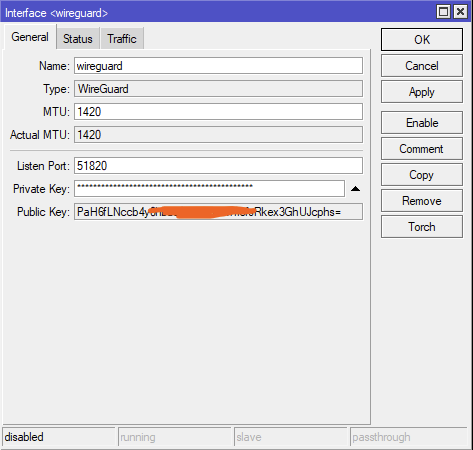
- Open WinBox > Connect your router > WireGuard > Interface WireGuard > + > Name:wireguard (no matter) > Listen Port (no matter for client side, so as is) > Private Key:<client's private key> Apply > Public Key will be automatically generated > OK.
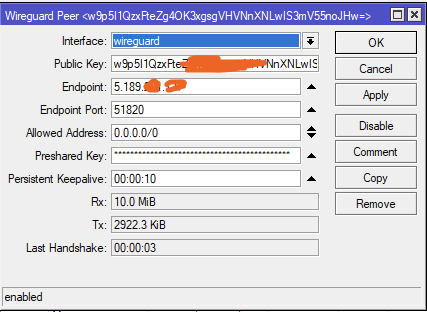
3. Create Peer with the server side credentials. Interface:wireguard, Public Key:<SERVER PUB KEY>, Endpoint:<SERVER EXTERNAL IP>, Endpoint Port<51820 is WireGuard default (configured due pivpn installing)> Allowed Address:0.0.0.0/0 > Preshared Key:<PRESHARED KEY FROM CLIENT's CONFIG FILE [Peer]> Persistent Keepalive:10 (no really matter).
4. Firewall > NAT > + > Chain:srcnat, Out.Interface:wireguard, Action: masquerade
Also keep default: Chain:srcnat, Out..Interface:<YOUR INTERNET PORT ON ROUTER (ether1 or so by default)>, Action: masquerade
5. Filter Rules > Don't touch. Client side doesn't require configuring.
6. IP > Addresses > + > Address:<INTERNAL ADDRESS FROM CLIENT'S CONFIG, FIRST DEFAULT: 10.186.212.2 SECOND 10.186.212.3 and so on (I created many configs so 10.186.212.8 is here) > Network is configured automatically on Apply button, Interface:wireguard
7. IP > DHCP Client > <YOUR INTERNET PORT> (ether1 or so, my "1 Internet port") > Advanced > Default Route Distance 2
8. IP > Routes > + > 1) Dst. Address:0.0.0.0/0,Gateway:wireguard > OK > + > 2) Dst. Address:<YOUR SERVER EXTERNAL IP>,Gateway<YOUR DYNAMIC IP>(exposed in already existing configuration, so I copied from above> 3) Dst.Address:<SERVER WireGuard Subnet IP>,Gateway:wireguard.