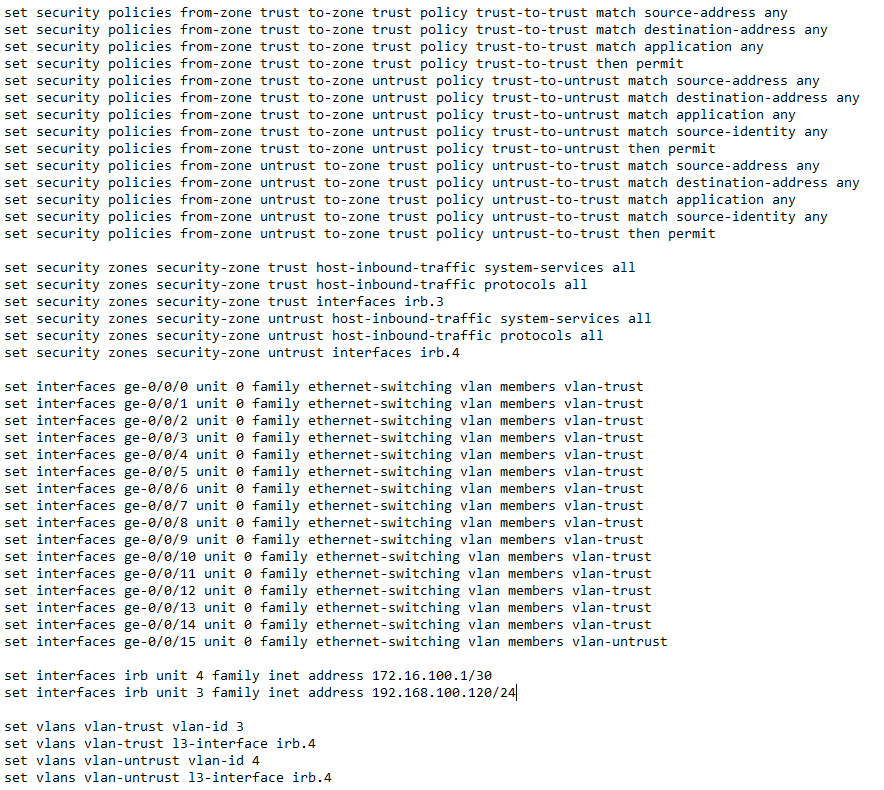
Первоначальная настройка представляет:
- Создание VLAN
- Создание зон безопасности
- Настройка политик безопасности
- Настройка интерфейсов
В нашем случае мы будем использовать названия VLAN's:
- vlan-trust - внутренний vlan (для зоны trust)
- vlan-untrust - внешний vlan (для зоны untrust)
Название для зон безопасности и VLAN могут быть любыми.
- Создание VLAN:
vlan-trust:
root@juniper# set vlans vlan-trust vlan-id 3
root@juniper# set vlans vlan-trust l3-interface irb.3
root@juniper# set interfaces irb unit 0 family inet address 192.168.100.1/24
vlan-untrust:
root@juniper# set vlans vlan-untrust vlan-id 4
root@juniper# set vlans vlan-untrust l3-interface irb.4
root@juniper# set interfaces irb unit 0 family inet address 172.16.100.1/30
- Настройка зон безопасности:
Разрешаем все сервисы в зоне trust:
root@juniper# set security zones security-zone trust host-inbound-traffic system-services all
Разрешаем все протоколы в зоне trust:
root@juniper# set security zones security-zone trust host-inbound-traffic protocols all
Добавляем интерфейсы в зону trust:
root@juniper# set security zones security-zone trust interfaces irb.3
Аналогично проделываем для зоны untrust:
root@juniper# set security zones security-zone trust host-inbound-traffic system-services all
root@juniper# set security zones security-zone trust host-inbound-traffic protocols all
root@juniper# set security zones security-zone trust interfaces irb.4
- Создание политик безопасности:
Нужно создать 3 политики безопасности для зон:
trust-to-trust - для передачи внутри сети
trust-to-untrust - для передачи из внутренней сети во внешнюю
unrtust-to-trust - для передачи из внешней сети во внутреннюю
Для политики trust-to-trust:
root@juniper# set security policies from-zone trust to-zone trust policy trust-to-trust match source-address any
root@juniper# set security policies from-zone trust to-zone trust policy trust-to-trust match destination-address any
root@juniper# set security policies from-zone trust to-zone trust policy trust-to-trust match application any
root@juniper# set security policies from-zone trust to-zone trust policy trust-to-trust match source-identity any
root@juniper# set security policies from-zone trust to-zone trust policy trust-to-trust then permit
Для политики trust-to-untrust:
root@juniper# set security policies from-zone trust to-zone untrust policy trust-to-untrust match source-address any
root@juniper# set security policies from-zone trust to-zone untrust policy trust-to-untrust match destination-address any
root@juniper# set security policies from-zone trust to-zone untrust policy trust-to-untrust match application any
root@juniper# set security policies from-zone trust to-zone untrust policy trust-to-untrust match source-identity any
root@juniper# set security policies from-zone trust to-zone untrust policy trust-to-untrust then permit
Для политики unrtust-to-trust:
root@juniper# set security policies from-zone untrust to-zone trust policy untrust-to-trust match source-address any
root@juniper# set security policies from-zone untrust to-zone trust policy untrust-to-trust match destination-address any
root@juniper# set security policies from-zone untrust to-zone trust policy un trust-to-trust match application any
root@juniper# set security policies from-zone untrust to-zone trust policy untrust-to-trust match source-identity any
root@juniper# set security policies from-zone untrust to-zone trust policy untrust-to-trust then permit
- Настройка интерфейсов:
Сделать нужные порты членами одной виртуальной локальной сети (VLAN):
root@juniper# set interfaces interface-range interfaces-trust member-range ge-0/0/0 to ge-0/0/14
Принадлежность к vlan-trust:
root@juniper# set interfaces interface-range interfaces-trust unit 0 family ethernet-switching vlan members vlan-trust
root@juniper# set interfaces vlan unit 3 family inet address 192.168.100.120/24
Принадлежность к vlan-untrust:
root@juniper# set interfaces ge-0/0/15 unit 0 family ethernet-switching vlan members vlan-untrust
root@juniper# set interfaces vlan unit 4 family inet address 172.16.100.1/30
Итог
Вводим show | display set и смотрим что получилось: