
If you’ve been on Facebook lately, you might have noticed a new notification in your feed explaining how the company uses its facial recognition technology and manages the accompanying data. As part of this, Facebook has rebranded the setting you’ll need to know to turn off its ability to find your face in photos across the service, if you’re not a fan of the concept.
The notification is being sent to users who previously enabled Facebook’s “tag suggestion” feature, as well as to new users. There’s also an official Facebook blog post if you didn’t catch the alert and you’re curious to learn more about Facebook’s policies around face recognition.
As the blog post explains, the “tag suggestion” setting is now being rebranded as “facial recognition” to better represent what the feature does. Turning it off disables Facebook’s auto-tagging suggestions and photo review features, but you’re still able to tag (or be tagged) in photos manually.
How to find and edit facial recognition permissions on Facebook’s website
The recent notification includes a shortcut link that takes you directly to the face recognition settings, but it’s easy enough to find yourself, too.
On desktop
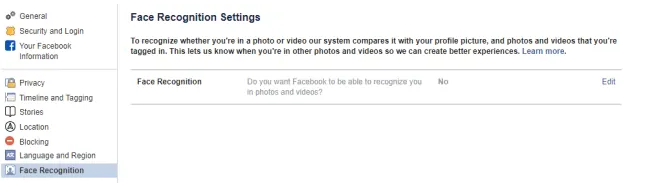
1. Log into Facebook.
2. Click the down-arrow icon in the upper right of the page, then go to Settings > Face Recognition.
3. Click “Edit” next to “Do you want Facebook to be able to recognize you in photos and videos.”
4. Select “No” from the drop-down box to disable facial recognition, then click “Close.”
How to find and edit facial recognition permissions in the Facebook app
1. Open the Facebook app
2. From the main screen, tap the three-stacked dots icon.
3. Scroll down and tap “Settings & Privacy.”
4. Go to Settings > Privacy > Face recognition.
5. Tap the “Do you want Facebook to be able to recognize you in photos and videos” box.
6. On the next screen, select “No” if you want to disable the feature, then tap the “back” arrow a few times to return to the main app screen.