Follow me
5.2.1. Form T-13 Customizing
To Customize this form follow by this patch:
IMG-> Payroll-> Payroll: Russia-> Reporting-> Time Management-> Working Time Schedule (Form T-13)
5.3. Time management (TM) Data Migration
For Time Data Migration is used LSMW-tool .
5.3.1. Absences Migration
- IT 2001 – Absences
- IT 2002 – Attendances
5.3.2. Absence quota Migration
- It is migrated remains days for certain periods for IT 2006 Absence Quota
- It is migrated data type for vacation from IT 0041 Date Specifications
6. Payroll(PY) Issues
Russian Payroll is very complex and difficult in SAP ERP HCM, like in US Payroll , so before its implementation, I strongly advise to find a Russian consultants in order to evaluate realization and real terms of implementation. To understand the depth of the problem look at the scheme RUS0.
6.1. Payroll (PY) Customizing :
For payroll, you should use the standard Payroll driver HRUCALC0 and the modified schema RUS0, if it is installed EHP5, it could be use HRUCALC0_CE and schema RU0C.
6.2. RU PY Infotypes Customizing
6.2.1. It0009 Bank Details
Bank details are designated by employee on infotype 0009. It is required only configuration for this is population of the BNKA table with bank details such as key, bank name, address, etc.
6.2.2. IT0048 Residence Status
The data on the residence status in the country influences on the calculation of income tax: those employees who are not tax residents are charged 30% income tax, whereas tax residents are charged 13% tax rate.
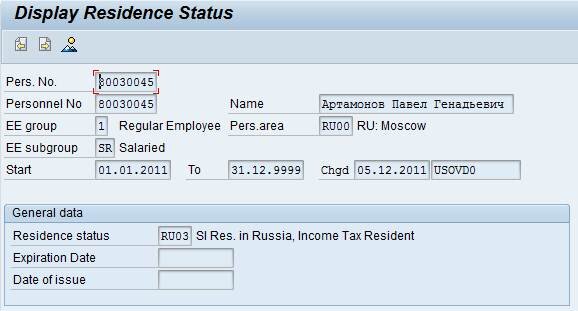
Image 13. IT 0048 Residence Status
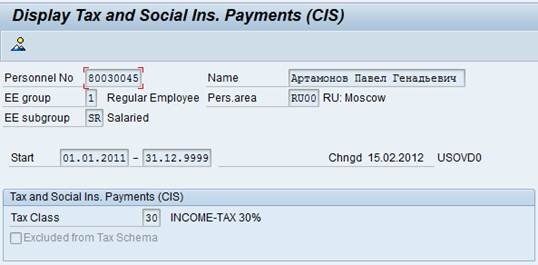
6.2.3. IT0291 Tax and Social Ins. Payments (CIS)
This infotype is used for maintaining information about taxes and net payments.
6.2.4. IT0292 Add. Social Insurance Data (CIS)
Infotype 0292 is used for maintaining information about employee social group. This information is needed for sick payments.
6.2.5. IT0293 Other and Previous Employers (RU)
In this infotype stored information about previous employers payments for current tax year.
6.2.6. IT0296 Garnishment Documents (CIS)
It is using for recording details of the staffs garnishment documents. The system automatically create IT 0295 Garnishment Orders (RU) after completing the infotype 0296 Garnishment Documents (RU) . Used to register the amount of the garnishment document. Impassible to enter the record in the infotype 295 if there is no corresponding record in the infotype 0296.
6.2.7. IT0299 Tax Privileges (CIS)
IT 0299 Tax Privileges (CIS) is used to maintain individual tax exemptions: income tax exemption for a child, tax deduction (Art.218 Cl. 2), tax deduction (Art.218 Cl. 1, 219), material tax deduction etc. It is connected with individual Benefit flag in table T7rut3
6.3. WT Catalog Peculiarities
Wage type catalog is a list of charges, deductions and taxes. Russian WT catalog includes round 580 Technical Wage types, round 448 Dialogs Wage types ( wage types with R*** and N*** are used for Regional and North Conditions).
When you create your own WT in RU WT Catalog , take the following into account:
Step
Table
Value
Description
1
V_512W_O
Wage type(WT) code creation and WT Valid dates
2
V_512W_T
Short and full name of WT
3
V_511_B
Define the required personnel area and employee group
4
V_T512Z
Define Wage type permitted WT for infotypes
5
V_512W_O
10
Define Class for reducing in proportion to the worked hours
6
V_T511
Payment type (deduction/accrual), input type ( amount, percent, constant, automatically)
7
V_512W_B
Define valuation bases
8
V_512W_O
30 C
Define Class for cumulation period
9
V_512W_O
65
Valuation according to principle of averages
10
V_512W_O
13, 14
Include in cumulation for Total gross amount
11
V_512W_O
20, 21, 22, 23, 24, 25, 26
Include in cumulations for Pension Social Security and Medicine Funds
12
V_512W_O
02, 03
Define analysis class for output in Pay slip
13
T7RUNC
Included in Wage type grouping for the reporting
14
V_T52EZ
Define for postings (Debit/credit)
Table 2. WT creation for RU-Wage type catalog
6.4. Payments peculiarities
There are also Fixied Salary payments and Hourly wage in Russia. In Russia there are a lot of compensatory payments connected with working conditions. Regional premium is made for work in the regions of Extreme North and equivalent areas. Calculation is made by multiplying regional premium rate by a sum of charges in a calculation month subject to regional premium rate charging.
It is customized in the feature 33BMC For every personnel area is assigned Bonus Model. Bonus Model is maintained in table T7RUB1. It is assigned to Bonus Model wage types and scales in table T7RUB3. The names of bonus scales are maintained in table T7RUB4. The percent of allowances is input in table T7RUB5.
Payments for Harmful conditions are made for hours worked to employees whose positions are connected with insalubrious and hazards working conditions. Usually it is input Payment for harmful working condition in It 0015 or put time in IT 2002 or 2010 and then It is calculated through time evaluation than it will be proceed in rule RU25.
Payments for non-worked hours ( e.g. Vacation, Donor days) with average earnings maintained. Salary calculation is made on the basis of average earnings. The calculation period is considered as 12 calendar months preceding the month of the beginning of the event. Daily earnings are calculated by dividing the sum of earnings for the salary calculation period by the worked days for this period. Average earnings sum is defined as the product of average daily wages by the days of absence.
All types of paid absence refer to the appropriate Absence valuation rule, which connection is configured in view V_554S_G.
Te common evaluated absences are grouped by the Absence evaluation rule . The rule defines evaluation as a paid absence, and then generates a WT for accruals . Absence evaluation rule is maintained in view V_T554C.
The Cumulation rules are configured in view V_T51AV_B in accordance with cumulative types of payments – the basis of average values.
6.5. Tax peculiarities
Personal income tax is collected from all staff that are tax residents of the Russian Federation, as well as from the staff members that get income from the sources of the Russian Federation and are not tax residents of the Russian Federation.
Depending on category of tax payer Income tax can be 13, 30 and 35%
Tax schema controls the payments for income tax. It is customized IMG -> Payroll-> Payroll: Russia-> Tax and Social Insurance Payments-> Maintain Taxes and Social Insurance Payments.
Each Personnel area has Tax schema in table V_T7RUP0. Tax schemas are described in table T7RUP1. Personnel grouping for Tax schema is described in feature 33ТАХ.
Depending on thee return value of feature fro m the table T7RUP3 , it will catch up with some tax class. Tax classes is maintained in table T7RUT1. Here you specify the scale for the deduction of taxes and benefits that must be applied to this tax.
To calculate the tax base tax payers can get standard tax deduction. Standard tax deductions are provided to the tax payer on the basis of his written statement and the documents confirming the right of such tax deductions.
The size of tax deductions is configured in the view V_T7RUT3.
6.6. Sick leave peculiarities
In Russia there is a lot of Sick leaves. Sick leaves are paid partially by Employer and by Social Security found. Generally , Sick leave Payment is calculated on the basis of average earnings. The average daily wage is calculated by dividing the sum of earnings for 2 years at 730.
The function RUSIO proceed the Sick leave. The total amount of average earnings (based on the data received from other employers) for each calendar year does not exceed the limit value base for the calculation of insurance premiums to the FSS RF, established in 2012 (463,000 rubles) , it is defined in table T511P . Amount of daily allowance is calculated by multiplying the average daily wage rate on the insurance seniority.
In table T7RUT5 is stored the amount for Social group (which is defined in table T7RUT6)
In table V_T7RUT5_PAID you can assign the amount of sick leave days and WT which paid by employer.
Amount of payments for sick leaves ,e.g. 1,5 year Child care leave , is configured in table T510J . Wage types SI10, SI11 in IT 0293 stores bases for the calculation of insurance premiums in the FSS. The Wage type SIRT in IT0015 stores averages rate for Sick leaves pavement.
6.7. Deductions peculiarities
Fines and Alimonies are maintained in table T7RUG1. Types of Garnishment orders are maintained in table T7RUG0. It is processed by the function RUAID.
In the case of processing multiple deductions priorities are processed by function RUPRI.
The rules for deductions are adjusted in the table T7RUD3. Priority of processing in case , if it is not possible to deduct the whole sum, is stored in view of V_51P6_B.
6.8. RU Payroll Schema – RUS0
Subschemas
Description
- Initialization (subschema XIN0)
The start of payroll processing
- Master Data Processing (subschema XBD0)
ENAME – Determine name of Employee from IT 0001
WPBP – Read Work Center/Basic Pay Data
RUSPL- function is used for internal table WPBP splitting in case of :
1)Absence registration in IT2001
2)There is a dates in table T51D5
P0014 –WPBP split in accordance with periods from IT 0014
- Import last payroll results
Subschema RUR0 – Import previous result current period
Subshema RULP- Import last regular payroll result
RUFUP (Parameter 4 = PTAB) – Import table FUP from OFUP
- Import additional payments/deduction (Subschema RUP9)
P0014 – Import WTypes from IT 0014
P0015 – Import additional Payments from IT 0015
RU293 – import data from previous Employer from IT ИТ0293
RU267 – Import additional off-cycle payments from IT 0267
Rule RUSC – Prepare percent of allowances For regional and North condition.
- Time Wage Types Processing (Subschema RUT1)
RURAB – Absences reading according with quotas
RUNAB – Refinement of the table AB (a partition shall record the absence on the calculating period)
PAB – Absence processing
RUGAB – This function determines the duration of periods with a 40- week spread over five or six working days (target time), defined by :
– Duration of incomplete periods
-Duration of complete periods
-Target time for one year
-Target time resulting from absences.
P2003 – imports the shift substitutions entered in infotype 2003
PARTT (PSP) – Defining the parameters of incomplete periods
Rule RU1N – Create valuation bases (addition)
Rule RUM0 – Determine payroll modifiers
DAYPR – Day processing
Rule RU33 – Evaluation basis (division) creation also WT /010
Rule RUF0 – Time calculation for Averages
Rule RUF4 – Numbers in calendar days for Vacations
Rule RUF3 – Number of public holidays
Rule RUMN – Minimal Salary calculation for Sick leaves
P2010 X930 –Import employee remuneration information from IT 2010
ZLIT – Total records – to ZL and IT
P0416 – Process Quota Compensation
RUOAV – Check the data in field SPPE1 in IT2001 for Absence.
Subschema XIW0 – Incentive wages
Rule RU25 – Valuation of time wage
Rule X020 – Gross and RT storage for time wage for calculation class 3
Business trips
(Subschema RURE)
ASREI – The function ASREI cumulates all the travel expenses for an employee per period in wage types
- Factoring and storage time wage types (Subschema RUL0)
If the employee is not working full time, you must recalculate the sums to obtain the proportionally
worked time. This requirement is performed in schema RUL0.
Rule RU23 – Gross input and storage in RT in accordance with 20 Processing Class.
- Valuation of averages (Subschema RUAV)
Sub-schema RUAV and RUA0 perform all absence calculation
The function RUAVE is proceeded the technical WT / V*, generated by the rules of RU17, RU18, just before calling the function, along with the main type of payment for M *, generated by a function of PAB in the absence proceeding, based on the settings table T554C.
Rule RUA3 – Processing Averages after RUAVE
Rule RUA4 – Processing Sick List
Rule RUA5 – Restricts Baby Care Compensations (Maternity leave for 1,5 year)
Function RUFUP processes the results table for calculating to future periods, that is, table FUP.
Rule RU62 – Cumulation & storage WT in accordance with 62 Processing class .
- Process & prepare old and retro results (Subschema RURC)
Subschema RUSC Derived WT ( regional, northern ). Generates WTs for regional and north allowances . Percent value is prepared by the rule RUSC, which is used separately for basic payments , bonuses, vacation payments.
Loan processing
- (Subschema RUL0)
P0045 – Function P0045 processes the master data in the Loans infotype (0045) Loans
RUC45 – The function redefines all currency fields related to loans to another currency.
Processing deductions and storage
- (Subschema RUD9)
Rule RU14 – processing delay of the preceding period
Rule RU64 – rounding WT in accordance with Processing Class 64
Subschema RURC – Process off-cycle data
Subschema RUID – the main processing of Garnishment documents
Rule RUDE – Process Garnishments in accordance with priorities
Rule RUI2 – Rule processing Fee for garnishments
Rule RU35 – Gross cumulation, cost distribution in accordance with Processing Class4
Rule X024 – Gross input and storage in RT in accordance with Processing Class 41
Taxes
- (Subschema RUTX)
RUTAX proceed information from IT 0001, 0002, 0048, 0291
It calculate taxes in accordance with table T7RUT1:
– initial launch of the rules for calculating taxes, the formation of variable RU **,containing bases of evaluation for the calculation of taxes;
– Define Tax Privileges from IT 0299;
– Consistent calculation of the tax benefits according to the priority benefits, subtract benefits from taxable income of the employee;
– Calculation and save the amount of tax in in created WT
GRSUP – calculates the corresponding gross values for each guaranteed net amount from table T541N
Rule RUD9 – Gross input and storage in RT in accordance with Processing Class 70
- Calculation the amounts after deduction
RUA9 RUD1 – proceed WT from the previous periods (from LRT into IT)
RU30 – Net part summation
RUPRI – processes additional tables for deductions
- Net payments/deductions and transfer (Subschema RUN0)
There are the following features in this subschema :
calculation of delta for income taxes,
the transfer of deltas from the previous period,
the reading function
P0011 data for bank transfers from the in IT 0011,
the transfer of alimonies and fines, the formation of the payment amounts, the function reads data from P0009 Employee bank account detail in IT 0009
Retroactive accounting
- (Subschema RURR)
Used for Payroll recalculation
Total amounts
(Subschema RUE9)
Export results in cluster
(Subschema RUO2)
Check table IT, refresh table RT
ADDCU – Update cumulations according to the processing class (CRT)
EXPRT UR – Export Payroll Data in Payroll Cluster UR.
Table 3. Russian payroll Schema RUS0
6.9. Posting Peculiarities
Most posting configuration can be found at IMG path: Payroll à Payroll: Russia à Reporting for Posting Results to Accounting.
- Table T52EK is where symbolic accounts must be defined.
- Table T52EL maps wage types to symbolic accounts including posting details such as account type and credit/debit designation.
- Table T52EM is where EE grouping codes are defined.
- Feature PPMOD is where employees are assigned to grouping codes based on organizational data.
- Date identifier for posting – V_T549S_B
6.10. Reporting (PY)
PY reporting is the also the difficult theme in Russian Reporting. It is required to customize the output form in .PDF format and download the report in .xml format.
6.10.1. Pay slip
Pay slip is customized as usually in tr. PE51 . It analyses classes for WT , which you defined for output wage type in Pay slip
6.10.2. Form 4 FSS- form is for payment of contributions to the fund of social insurance
6.10.3. Form RSV-1-form is for the calculation of accrued and paid insurance premiums to the Pension Fund of the Russian Federation, the insurance premiums for compulsory health insurance in the Federal Fund for compulsory medical insurance and territorial funds of compulsory medical insurance payers of insurance premiums, making payments and other compensation to individuals.
6.10.4. Form SZV 6-1-2- Information on accrued and paid insurance contributions for compulsory pension insurance of the insured and the insurance period of the insured , 6-2- Registry data on assessed and paid insurance contributions for compulsory pension insurance and the insurance period of the insured
6.10.5. Form 2 NDFL- a form on which employers report for taxes assessed on personal income
6.10.6. Payroll Sheet (Form T-53)- is payroll unified form
6.11. Data Migration (PY)
6.11.1. Data Migration for previous Employer
Create files for IT 0293 for WT /DA0 , SI09, SI10 аnd loaded tax deductions through LSMW.
6.11.2. Data Migration for Payroll Cluster
You must download the data for the year prior periods in order to ensure the correct calculation of pay for the average values ??within a year after the start of a productive system For this purpose, load data into tables T558B and T558D, or use outdated table to load the T558A, which contains fewer fields than the previous table. Loading of the tools used, or LSMW – BUS7023 and IDOC to load the data, but in this case triggered numerous checks and loading is interrupted when transferring 100,000 entries and more. The second option – developing its program for downloading data base can be taken from this. Before the Migration the Personnel Administration data must already be uploaded the staff, and WT should be customized
The order of loading:
1.Check the format and completeness of the data being loaded
2. Erase entries in the tables T558
3 Load the records into a table with the help of a program or LSMW
4. . Clean the cluster of loud personnel numbers with the report – RPUDEL20 or its modification
5 Use a standard report RPUTRBK0 and move the date in IT 0003 “The status of the calculation of” employee number of load
6. Create your chart data is loaded into the cluster with scheme RU30 or RLK0
7. load the required personnel number with created Migration Scheme in Payroll driver HRUCALC0
SAP also proposed a new solution for PY Migration in the note 1677296 – HR-RU: Report HRUURU30 – Uploading old payroll data to SAP